Turning a book idea into a finished manuscript takes structure. To stay organized, many authors turn to planning tools that help them manage character arcs, timelines, story bibles, and other key story elements before they write the first sentence.
The ideal planning tool depends on whether you prefer visual timelines, deep world-building wikis, or all-in-one environments that combine outlining, drafting, and typesetting. In this post, we compare seven of the best novel planning software tools on the market.
Here's a quick overview:
|
⚙️ Software |
🖋️ Type |
💸 Pricing |
💻 Platform |
🏆 Best for |
|
Reedsy Studio |
All-in-one outlining, drafting, and formatting studio |
Free core app; Craft add-on $4.99/month; Outlining add-on $7.99/month |
Web-based on desktop, tablet, and mobile |
Authors who want to move seamlessly from planning to drafting and publication-ready export |
|
Plottr |
Visual timeline and story-bible planner |
From $60/year or $150 lifetime; Plottr Pro from $9.99/month |
Native Mac and Windows apps; Pro adds browser and mobile access |
Visual plotters who want beat-sheet templates, parallel plotlines, and a clear scene grid |
|
Scrivener |
Long-form outlining and drafting environment |
$59.99 per Mac or Windows licence; iOS app $23.99 |
Mac, Windows, iPhone, and iPad |
Writers who want their outline, research, and manuscript in one desktop project |
|
Milanote |
Freeform visual canvas and mood-board tool |
Free up to 100 notes, images, or links; Pro from $9.99/month billed annually |
Web, Mac, Windows, iOS, and Android |
Visual thinkers developing characters, settings, relationships, and early-stage ideas |
|
Campfire |
Modular writing and world-building suite |
Free limited plan; full access currently $12/month; individual modules and lifetime purchases available |
Web, Mac, Windows, iOS, and Android |
Fantasy and science-fiction authors managing extensive lore, timelines, cultures, and magic systems |
|
Obsidian |
Locally-stored knowledge base and story-bible workspace |
Free; optional Sync from $4/month billed annually |
Mac, Windows, Linux, iOS, and Android |
Writers who want a private, highly customizable wiki for interconnected research and series continuity |
|
Aeon Timeline |
Chronology and narrative continuity database |
$65 one-time, including one year of updates; additional updates $35/year |
Mac, Windows, iPhone, and iPad |
Authors managing complex chronologies, character ages, nonlinear narratives, or parallel histories |
Let's look at each tool in more detail.
1. Reedsy Studio
- 💰 Price: Free core writing and formatting tools; premium upgrades start at $4.99/month, while advanced Outlining costs $7.99/month.
- 💻 Access: Browser-based on desktop, tablet, and mobile; no dedicated app or offline mode.
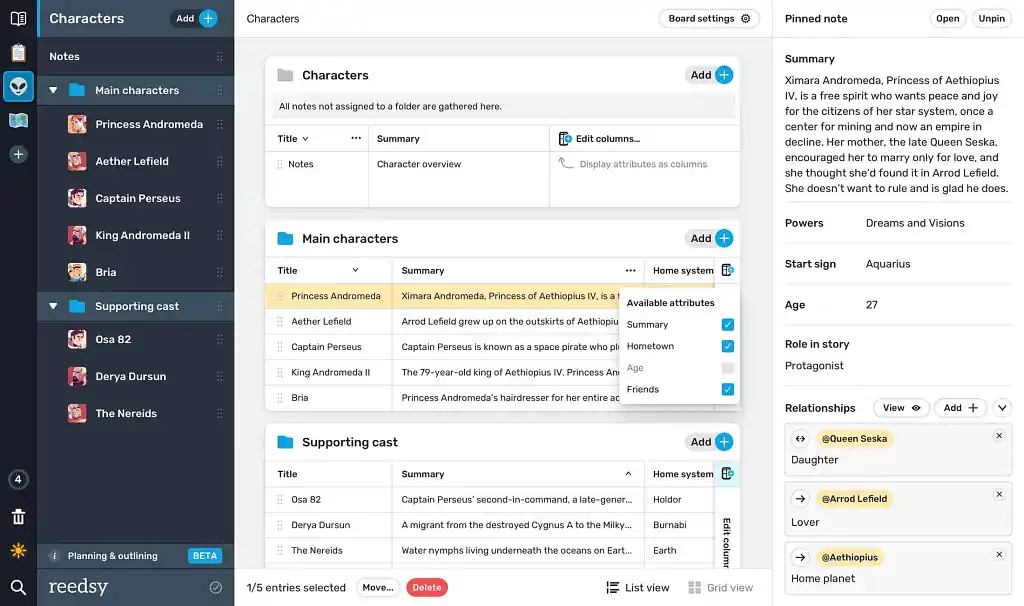
Reedsy Studio's novel planning feature is built around "Boards." These are customizable canvases where you drop notes, character profiles, location maps, and scene cards. There are more than 100 ready-made templates to start from, so you don’t have to invent a structure from scratch.
You can switch between a grid view and a list depending on how your brain processes information. The main tradeoff is that the planning board system relies on card-based grids and notes rather than complex drag-and-drop timeline matrices found in standalone plotting tools like Plottr (see below).
The free version includes one planning board, which is plenty for a single project. If you're managing a series or want unlimited boards, advanced attributes, and more, the Outlining add-on runs $7.99/month. There's a 30-day free trial with no credit card required, so you can test the paid tier before committing.
Verdict: Reedsy Studio is best for authors looking for a free or budget-friendly, web-based tool that keeps research and planning notes pinned right next to their manuscript.
👍 Pros:
- Free core plan includes manuscript writing and professional book formatting/typesetting.
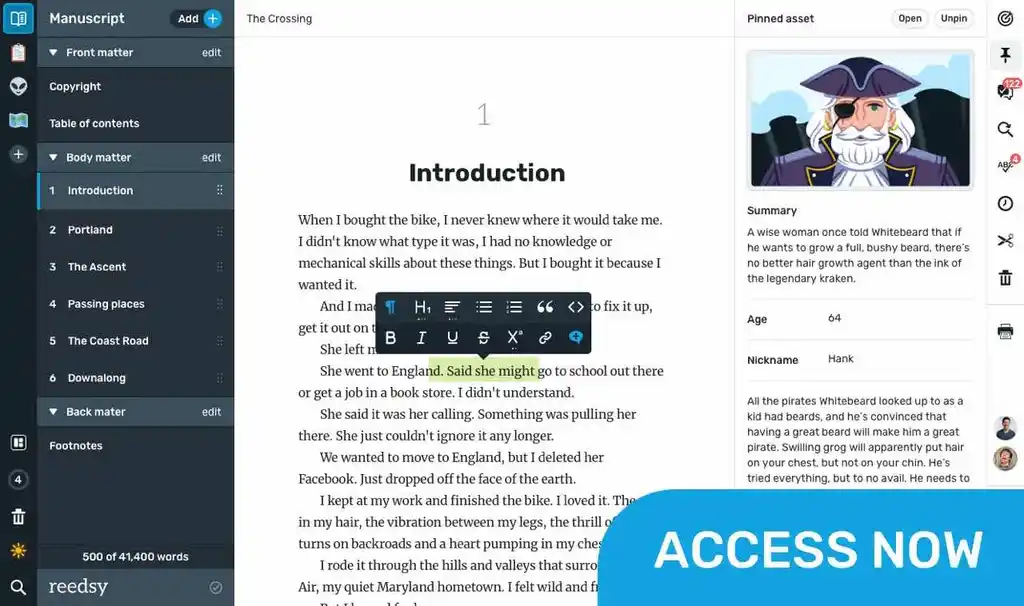
- Pinned planning cards remain visible alongside the drafting pane.
- Built-in template library for character sheets, world-building, and plot outlines.
👎 Cons:
- Outlining add-on requires a monthly subscription for unlimited boards.
- Lacks advanced visual timeline views or complex matrix grids.
- No offline mode
2. Plottr
- 💰 Price: From $60/year or $150 for a lifetime licence; Plottr Pro costs $99/year and adds cloud syncing, collaboration, and browser access.
- 💻 Access: Native desktop apps for Mac and Windows; Plottr Pro adds browser access on tablets, mobile devices, Chromebooks, and Linux.
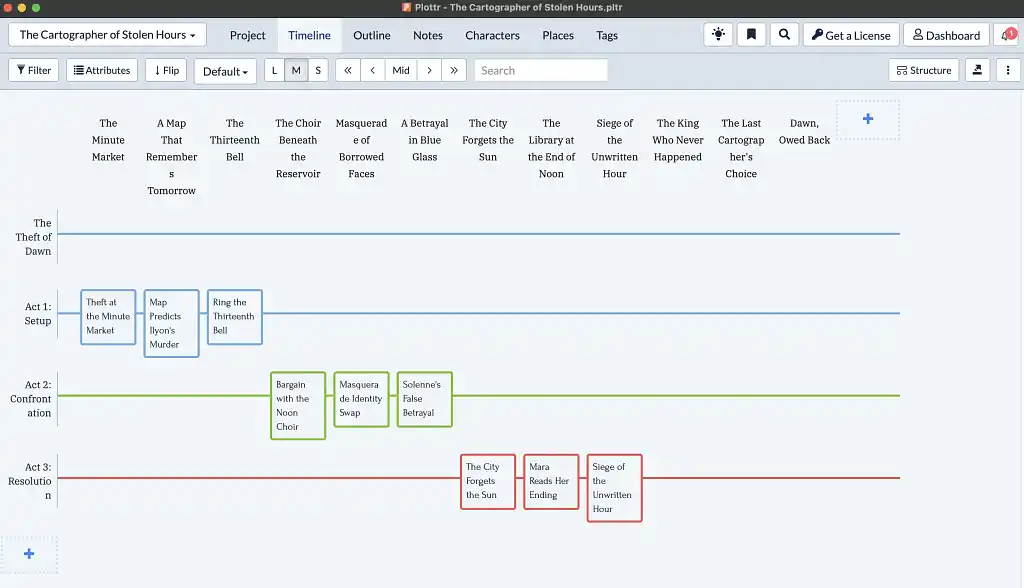
Plottr is a visual planning tool that helps authors organize a novel one scene at a time. Its main timeline looks like a color-coded grid: chapters or scenes run in one direction, while the main plot, subplots, romances, mysteries, and character arcs run in the other. You can drag scene cards around the grid to change their order and see how the different storylines develop alongside one another.
Writers who are unsure how to structure a novel can start with one of Plottr’s story templates. These include the Hero’s Journey, Snowflake Method, and romance frameworks such as Romancing the Beat. For example, you can place several scenes inside a chapter and note down each scene’s viewpoint character, goal, and central conflict. You can then filter the timeline to check whether a character disappears for too long or a subplot contains an obvious gap.
Plottr automatically turns the visual timeline into a conventional written outline. It also includes a story bible: a searchable reference area where you can store character profiles, locations, images, notes, and tags. When the plan is complete, you can export this information to Microsoft Word or Scrivener and begin writing there.
The main limitation is that Plottr is designed specifically for outlining (or, well, plotting) rather than drafting. Although you can write text inside its scene cards, it does not provide the full manuscript editor, revision tools, or formatting features of dedicated writing software.
Verdict: Plottr is best for authors who want to visualize cause and effect, coordinate multiple arcs, and catch structural problems before or during drafting.
👍 Pros:
- Flexible, color-coded timeline with draggable scene cards.
- Dozens of built-in and customizable templates.
- Automatic outlines and detailed story-bible tools.
- Configurable Word and Scrivener exports.
👎 Cons:
- Not a full manuscript-writing environment.
- The overall design feels a bit dated.
Read our full Plottr review for a closer look.
3. Scrivener
- 💰 Price: $59.99 per desktop platform; $23.99 for iOS (one-time purchases)
- 💻 Access: Desktop download for macOS or Windows; separate iPhone/iPad app
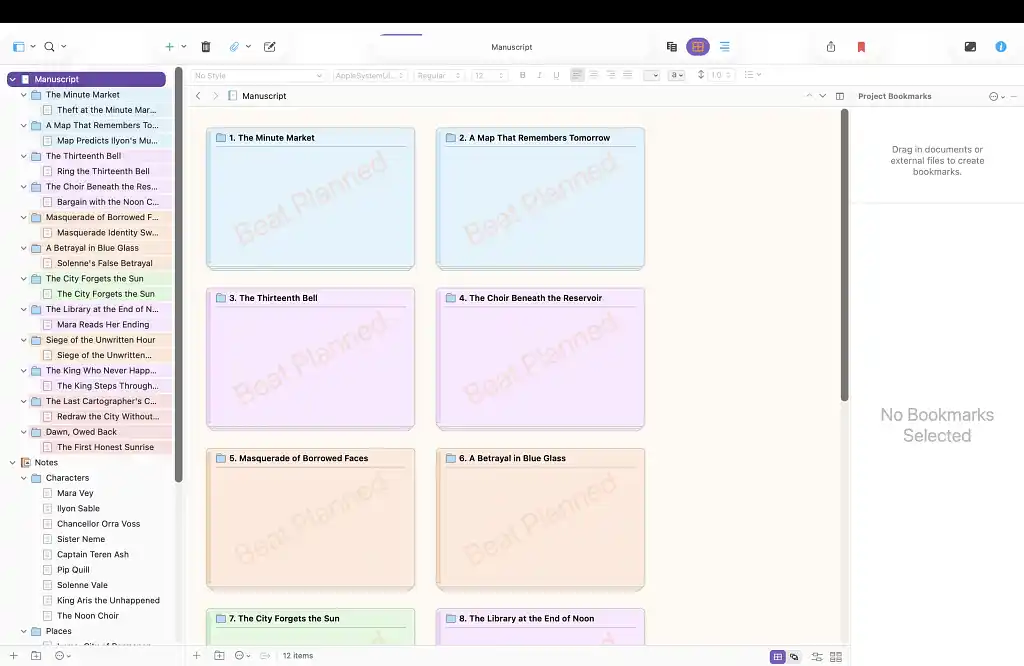
Scrivener is a writing program designed for large projects such as novels. Its Binder works like the contents panel of a digital filing cabinet: each chapter and scene has its own document, while character profiles, research notes, PDFs, and reference images can be stored in the same project.
You can plan the book using the Corkboard, which displays scenes as movable index cards, or the Outliner, which presents them as a detailed list with information such as word count and drafting status. For example, dragging a scene card into a new position also moves the corresponding text in the manuscript. Snapshots let you save an earlier version before rewriting, while Compile collects the separate documents and exports them as a single Word, PDF, or EPUB file.
The drawback is that Scrivener takes time to learn. It offers many menus and settings, and preparing a manuscript through Compile can initially feel complicated. Syncing projects between the desktop and mobile apps requires Dropbox or manual file transfers, and there is no built-in system for real-time collaboration.
Verdict: Scrivener is best for authors who want detailed control over planning, research, drafting, and export — and are prepared to learn a powerful but complex system.
👍 Pros:
- One-time purchase rather than a recurring subscription.
- Binder, Corkboard, and Outliner remain linked to the manuscript.
- Excellent tools for research, revision snapshots, targets, and export.
👎 Cons:
- Steeper learning curve than more streamlined writing apps.
- Separate licences are required for different platforms.
- Mobile syncing/file sharing depends on Dropbox or manual transfer.
Read our full Scrivener review for a closer look.
4. Milanote
- 💰 Price: Free for up to 100 cards and 10 file uploads; Pro has unlimited file uploads and costs $9.99/month billed annually or $12.50 monthly
- 💻 Access: Web, macOS/Windows desktop app, iPhone, iPad, and Android.
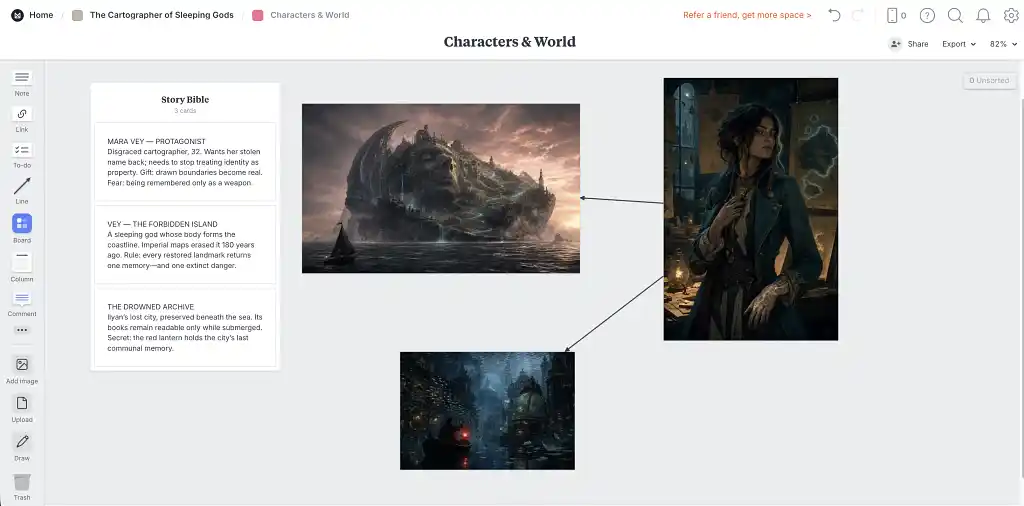
Milanote gives you a flexible digital canvas for planning your novel. Instead of following a fixed outline, you can place notes, images, links, and lists anywhere on a board, move them around freely, and create smaller boards to organize related material.
This makes Milanote particularly useful for creating character profiles, collecting visual inspiration, and developing settings. For example, you can place images beside descriptions or divide a board into columns for different acts and plotlines. New ideas can be stored in the Unsorted tray until you decide where they belong, while Scale to Fit lets you see the entire board at once. You can also use Presentation mode to share a clean version of your board with other people.
However, Milanote is a general visual-planning tool rather than dedicated novel-writing software. It does not include features for tracking chapters, scene details, or word-count goals. A large outline can also become difficult to navigate if you don’t organize it into clear columns and smaller boards from the beginning.
Verdict: Milanote is ideal for visual thinkers who want to develop a novel’s atmosphere, characters, world, and broad plot in a flexible workspace.
👍 Pros:
- Excellent mood-board experience.
- Flexible visual layout with useful zoom and presentation controls.
- Generous free plan for small projects.
👎 Cons:
- No dedicated manuscript or scene-tracking features.
- No pre-made story structure templates.
5. Campfire
- 💰 Price: Free limited plan; Standard currently $12/month (normally $19), with annual, lifetime, and custom module plans available.
- 💻 Access: Browser, Mac/Windows desktop app with offline access, and iOS/Android mobile app with some module limitations.
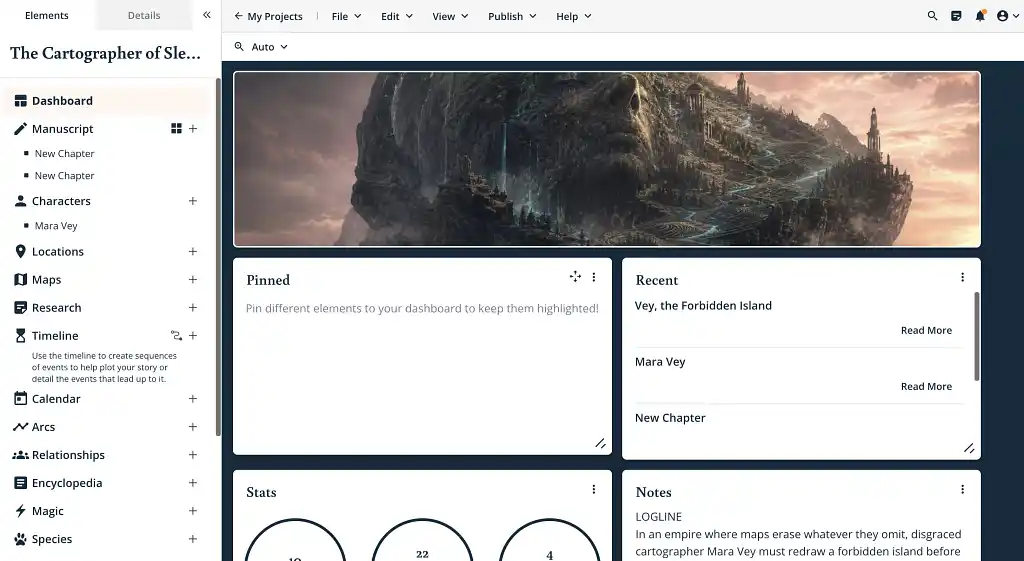
Campfire combines a place to write your manuscript with a large collection of planning and world-building tools. Instead of putting everything in one general notes section, it separates information into 18 connected modules. These include dedicated areas for characters, locations, timelines, maps, relationships, magic systems, cultures, languages, religions, and more.
For example, you can create a detailed profile for each character, including their appearance, background, personality, and relationships. You can then connect that character to relevant places, events, and story arcs. These notes remain accessible while you write, so you can check an important detail without leaving your manuscript.
This level of detail makes Campfire especially useful for complex fantasy and science-fiction projects. However, the number of modules and pricing options can take time to understand. If you are working on a simpler or contemporary story, you probably don’t need it.
Verdict: Campfire is a powerhouse for fantasy and science-fiction authors developing lore-heavy worlds, interconnected casts, or multi-book series.
👍 Pros:
- Exceptional range of dedicated world-building modules.
- Drafting, planning, research, and publishing tools in one platform.
- Customizable panels with extensive cross-linking between story elements.
- Browser, offline desktop, and mobile access.
👎 Cons:
- Denser and less immediately intuitive than Plottr or Milanote.
- Custom module pricing can be difficult to calculate upfront.
- Several mobile features are unavailable or only partially supported.
Read our full Campfire review for a closer look.
6. Obsidian
- 💰 Price: Free without limits; optional Obsidian Sync costs $4/month billed annually or $5 monthly.
- 💻 Access: Desktop download for Mac, Windows, and Linux, plus free iOS and Android apps.
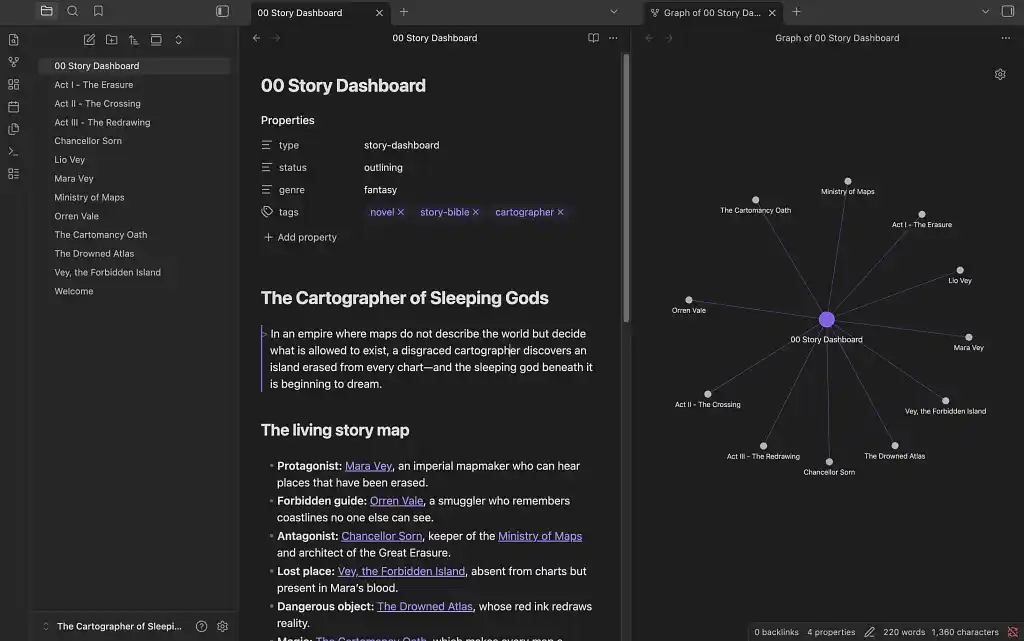
Obsidian works like a personal, offline wiki for your novel. Each project is kept in a folder called a “vault,” where you can create separate notes for characters, locations, scenes, factions, and research. These notes are stored on your computer as simple Markdown text files, so you retain control of the material and can open it with other programs.
Its main strength is the ability to connect related notes. For example, a character profile can link to the places they visit, the objects they carry, and the scenes in which they appear. Graph view turns those links into a visual map of the story’s relationships. You can also add properties such as a character’s role or a scene’s drafting status, arrange notes visually on Canvas boards, and display structured information in sortable, spreadsheet-like Bases.
The drawback is that Obsidian does not provide a ready-made novel-planning system. Unlike Plottr, Campfire, or Aeon Timeline, it doesn't include built-in beat sheets, specialized world-building forms, or advanced chronology tools. Writers have to create their own structure or add community plugins, and large collections of notes and links can become cluttered without careful organization.
Verdict: Obsidian is best for writers who want a highly customizable, locally stored story bible that connects research, characters, places, and plot ideas across an entire novel or series.
👍 Pros:
- Free core application with no account required.
- Powerful backlinks, properties, graphs, Canvas boards, and database-style Bases.
- Local Markdown files provide excellent portability and long-term ownership.
👎 Cons:
- Requires more initial setup than dedicated novel-planning software.
- No native beat sheets, advanced timeline engine, or manuscript compilation workflow.
Read our full Obsidian review for a closer look.
7. Aeon Timeline
- 💰 Price: $65 one-time license, including 12 months of updates; optional updates cost $35/year afterward.
- 💻 Access: Mac, Windows, and iOS on up to five devices. No browser or Android version.
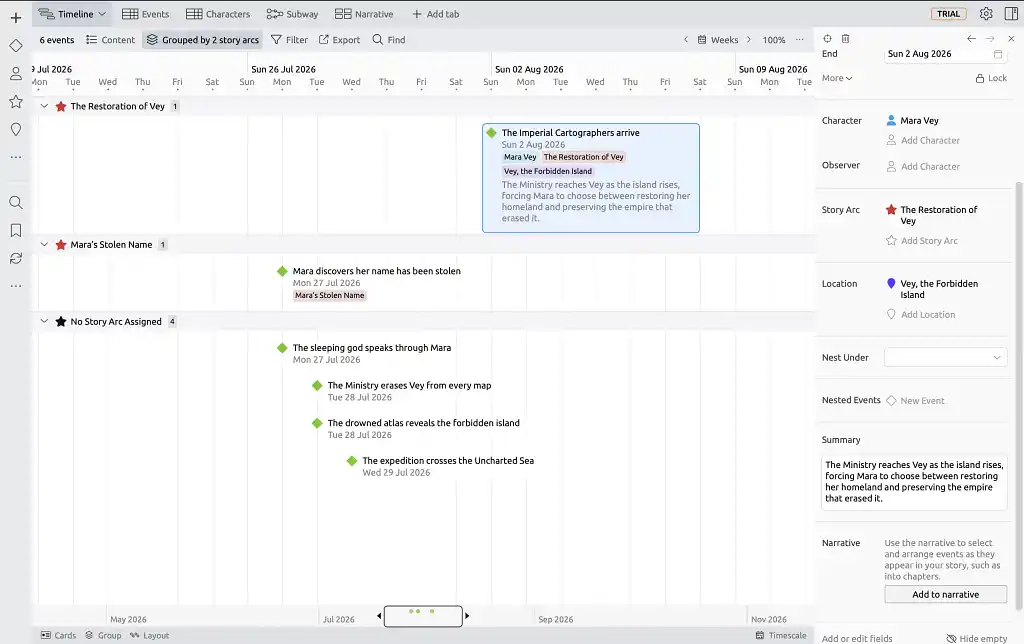
Aeon Timeline is a specialist planning tool for stories in which dates and timing matter. It places events on a visual timeline and lets you record when they happen, how long they last, which events cause others, and which characters and locations are involved. This is especially useful for novels with several generations, overlapping storylines, or events presented out of order.
The same events can be viewed in several ways. Timeline view shows when everything happens, while Spreadsheet view displays the details attached to each event in a structured list. Subway view works like a transport map, using intersecting lines to show where characters and storylines meet. You can also divide the timeline into visual lanes for different characters, locations, or plot arcs.
Most importantly, Aeon separates the order in which events happen from the order in which readers encounter them. For example, you can record a murder on its true date while placing its full explanation much later in the book. This makes it easier to plan flashbacks, mysteries, parallel plots, and multi-book series. Its Scrivener and Ulysses integrations can also connect timeline events to the corresponding manuscript scenes.
The drawback is that Aeon requires you to enter more dates and supporting details than a simpler visual planner such as Plottr. It is designed to manage chronology rather than write the manuscript, and it does not provide Campfire’s dedicated tools for characters, cultures, or fantasy world-building.
Verdict: Aeon Timeline is best for authors whose stories depend on precise chronology, character ages, parallel histories, or deliberately nonlinear storytelling.
👍 Pros:
- Exceptional tools for dates, durations, dependencies, and continuity.
- Separate chronological and narrative ordering.
- Bidirectional integration with Scrivener and Ulysses.
👎 Cons:
- No built-in manuscript drafting environment.
- More technical and time-consuming to configure than Plottr.
- No browser or Android version.
How to choose the right tool for your book
For most authors, Reedsy Studio is the best place to start. Its free core combines planning boards, drafting, collaboration, and professional EPUB and PDF formatting, allowing you to take a book from its earliest ideas to a publication-ready file without changing programs.
If you need more specialized planning, consider Plottr, Campfire, or Aeon Timeline. Plottr is best for visual beat sheets and parallel plotlines; Campfire excels at detailed fantasy and science-fiction world-building; and Aeon Timeline is the strongest choice for complex chronologies, character ages, and nonlinear narratives.
For writers who value control and customization, Scrivener combines outlining, research, and drafting in a powerful desktop environment, while Obsidian lets you construct a private, interconnected story wiki from local files. Milanote, meanwhile, is ideal for writers who prefer to brainstorm through images, mood boards, and freeform arrangements.
If you are still undecided, test your shortlist using one act, a few characters, and five scenes. Ultimately, the best planning software is not necessarily the one with the most features but the one that best fits your writing process.