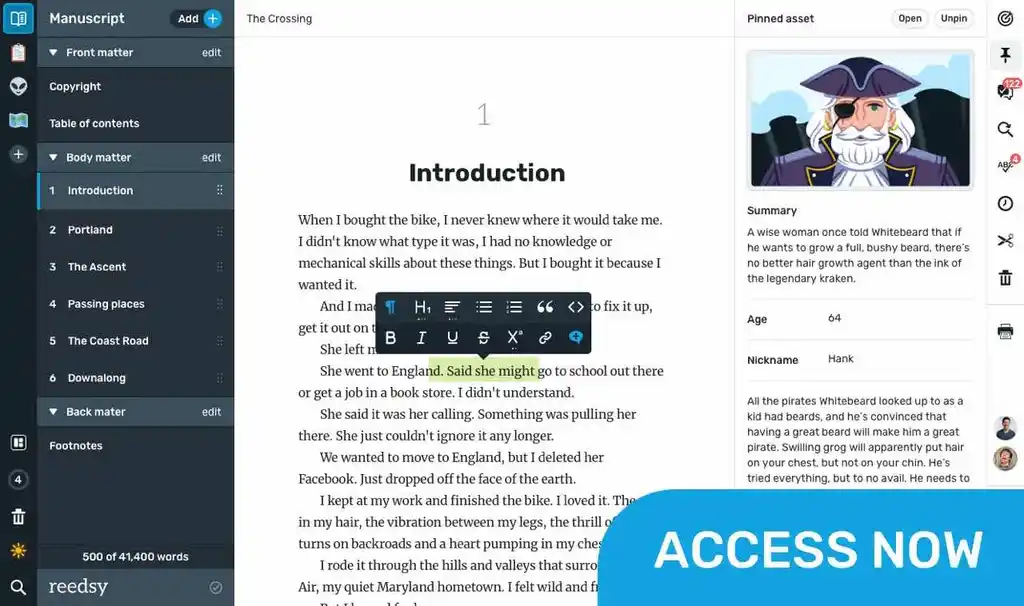
Whether you need a mindmap tool, a productivity timer, or professional formatting software, there’s an app for that. In fact, there are several apps for that — so how do you choose the right one for you?
We’ve tested 26 of the best writing apps to suit a range of needs. Here’s what we liked (and didn’t like) about each of them — and which ones we’d recommend for whom.
The best writing apps overall
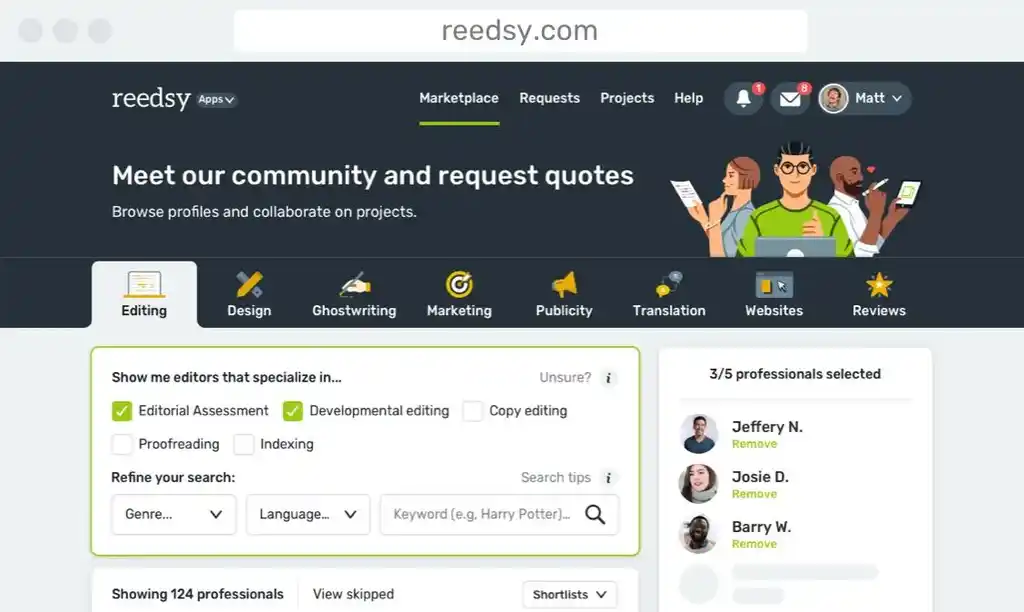
Across all our categories, there are a few writing tools that stand out. Reedsy Studio is our firm favorite because it’s the only app that can truly accompany your writing journey from start to finish — with planning templates, a clean text processor, excellent collaboration features, and professional-grade formatting.
When it comes to specialist apps, Story Planner is our top pick for ideation and plotting thanks to its sheer breadth and depth of templates. Novlr is great if you want a vibrant and active community, while FocusWriter excels at removing distractions. Finally, Scrivener offers the most advanced customization for writers with enough patience, and Vellum meets complex formatting needs in an accessible manner.
|
App |
Price |
Advantages |
Disadvantages |
Best for |
|
|
Free with optional add-ons for $4.99–$10.99 per month | True full-service app; excellent collaboration features; intuitive interface | No offline functionality | Planning, writing, editing, and formatting all in the same place |
|
|
Free for one plan at a time; $40 per year for unlimited plans | Hundreds of templates; detailed prompts | Plotting only | Plotting |
|
|
Free for Starter plan; $10 per month for Plus; $20 per month for Pro | Strong community; live writing sprints; integrated writing courses | Limited planning and formatting tools | Community |

|
Free | Eliminates distractions; customizable background; productivity features | Basic text processing only | Focus |
|
|
$59.99 | $59.99 | Very steep learning curve; no in-app collaboration | Customized workflows |
|
|
$199.99 for ebooks; $249.99 for print and ebooks | 26 customizable formatting templates | Mac only; expensive | Complex formatting |




However, there are plenty more writing apps, each with its own advantages and disadvantages. Read on for a detailed comparison of 26 writing apps, or skip ahead to the category you’re looking for.
Best full-service apps
It can get irritating when you have a different app for every stage of the writing process. These full-service apps allow you to do (nearly) everything in one place.
1. Reedsy Studio
Price: Free plan; $4.99/month for Craft; $7.99/month for Outlining; $10.99/month for Craft + Outlining. Save 10% with an annual subscription. 30-day free trial.
Platform(s): Web
First released: 2016
Star rating: ⭐️⭐️⭐️⭐️⭐️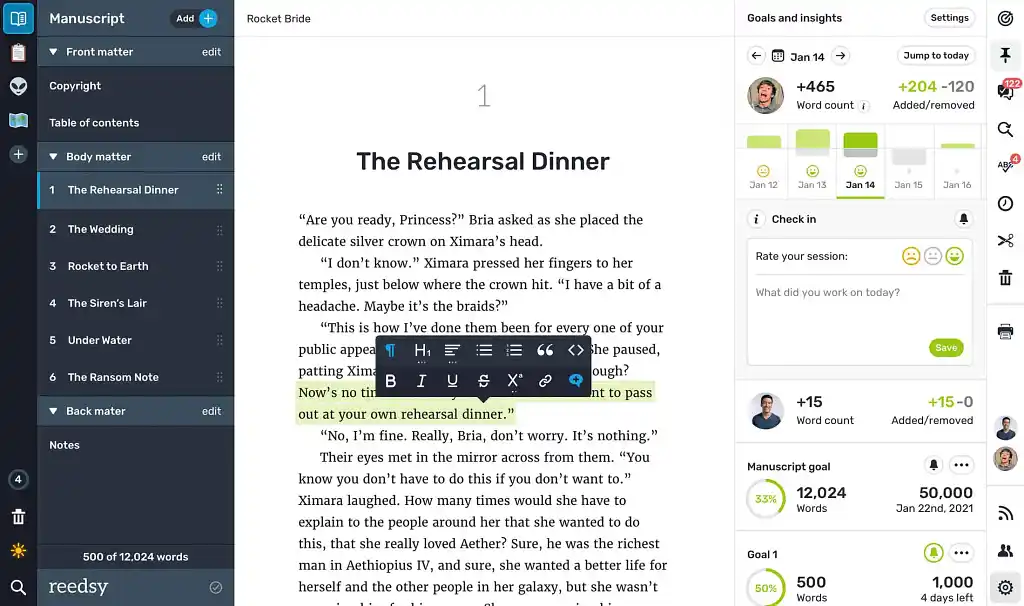 Reedsy Studio, formerly the Reedsy Book Editor, is the ultimate all-in-one writing app. With the free version of Studio, you get a beautiful online interface for writing, collaborating, and formatting — and an inspiring vision of the final product! Its Craft and Outlining add-ons provide even more guidance in the form of word count goals, advanced stats, and Boards and Templates to plan your story from start to finish.
Studio has a core user base of 85,000 writers, and it’s not hard to see why: this software truly does it all. To be sure, for most authors, Studio is the best overall app for writing and publishing a novel. You can start a 30-day free trial with all premium features, or upgrade to Craft + Outlining for just $10.99/month.
|
Pros of Reedsy Studio |
Cons of Reedsy Studio |
|
➕ Balanced writing interface that’s feature-filled yet clean |
➖ No offline functionality |
|
➕ Professional-grade formatting |
|
|
➕ Set goals with daily check-ins to stay on track (with Craft) |
|
|
➕ Unlimited Boards, Notes, and Attributes to organize your book (with Outlining) |
|
|
➕ Over 100 customizable planning templates (with Outlining) |
|
|
➕ Invite collaborators and track changes |
|
|
➕ Dark mode setting |
|
2. Scrivener
Price: $59.99 for macOS or Windows; $80 for both; $29.99 for iOS. Free trial for 30 days of actual use.
Platform(s): macOS, Windows, iOS
First released: 2007
Star rating: ⭐️⭐️⭐️⭐️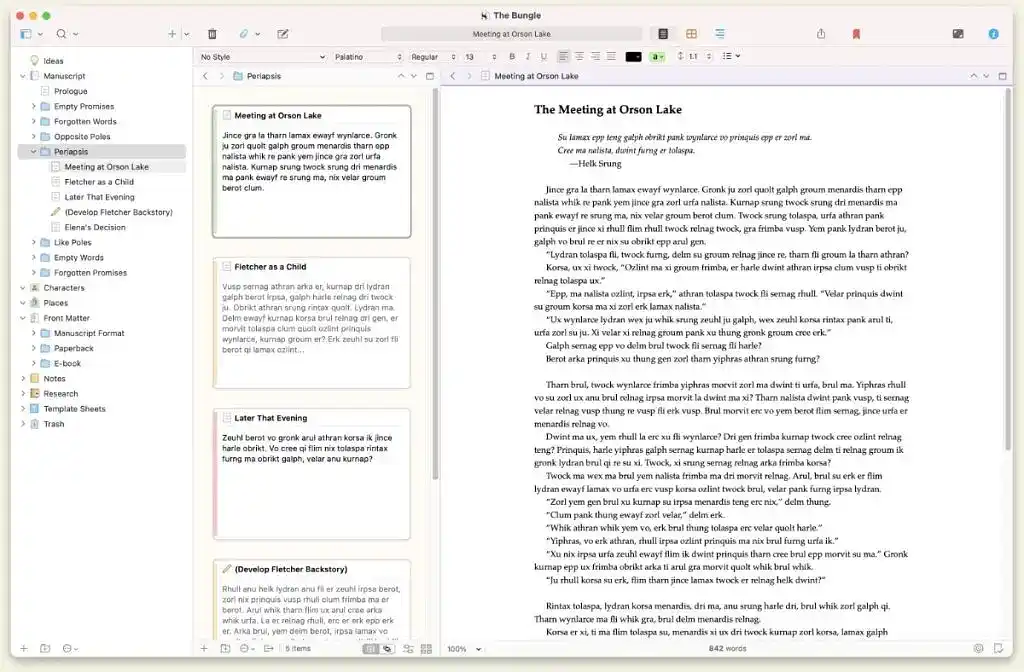 Scrivener is a longtime player in the writing app game. This full-service app was developed by a savvy team of writers, and requires just one license fee to use forever. Scrivener users especially love its signature “corkboard,” which helps organize your story and auto-aligns your chapters to match the order of your planning cards.
Scrivener is basically designed to help you work smarter, not harder, when building a quality book. However, you have to be pretty smart to master it in the first place: the app has a notorious learning curve and comes with a 900-page instruction manual. Still, if you can manage Scrivener, you know it will manage your project to perfection — until it’s time to work with an editor, at which point you’ll need to use alternative software or a clunky Dropbox workaround.
|
Pros of Scrivener |
Cons of Scrivener |
|
➕ Advanced corkboard for planning |
➖ Steep learning curve |
|
➕ Flexible sidebar “binder” so you can arrange elements to your liking |
➖ No in-app collaboration |
|
➕ Split-screen mode for multiple docs |
➖ Large projects can be slow to load |
|
➕ Free trial lasts for 30 days of actual use |
|
|
➕ One-time payment |
|
|
➕ Mobile app (iOS only) |
|
3. Dabble
Price: $9/month for Basic; $19/month for Standard; $29/month for Premium. Lifetime access $699. 14-day free trial.
Platform(s): macOS, Windows, web
First released: 2017
Star rating: ⭐️⭐️⭐️⭐️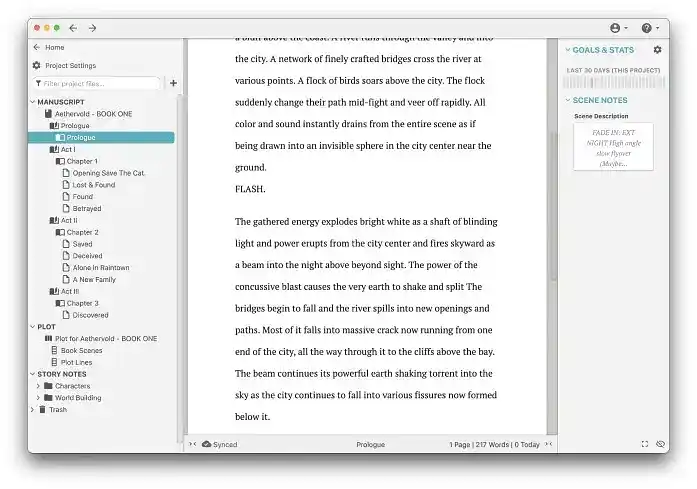 Dabble is a standard all-in-one writing app, albeit a highly functional one. Unlike Reedsy Studio or Scrivener, it works both as a desktop app and online, with impressive cross-app syncing. Its key features include a productivity sidebar, a grid-based plotting tool, and a collaborative setting to “Invite a co-author.”
While Dabble is not nearly as elaborate as Scrivener, many authors would consider its simplicity a plus — and it lives up to its name, letting you “dabble” in every kind of feature. However, it’s not a true full-service app, as it doesn’t allow you to professionally format your book or export it to publication-ready file types.
|
Pros of Dabble |
Cons of Dabble |
|
➕ Intuitive interface |
➖ Web version has limited data |
|
➕ Cross-app syncing for project backups |
➖ Character and story templates are fairly minimal |
|
➕ “Goals & Stats” for productivity |
➖ Expensive lifetime license |
|
➕ Timeline-style plotting to directly compare plotlines |
➖ No professional book formatting or export |
|
➕ Genre-based formatting templates (with aesthetics for romance, thriller, etc.) |
4. Bibisco
Price: Free for Community Edition; $69 for Supporters Edition with free updates for 2 years. $3.49/month extra for Android app. Free trial included.
Platform(s): macOS, Windows, Linux, Android
First released: 2014
Star rating: ⭐️⭐️⭐️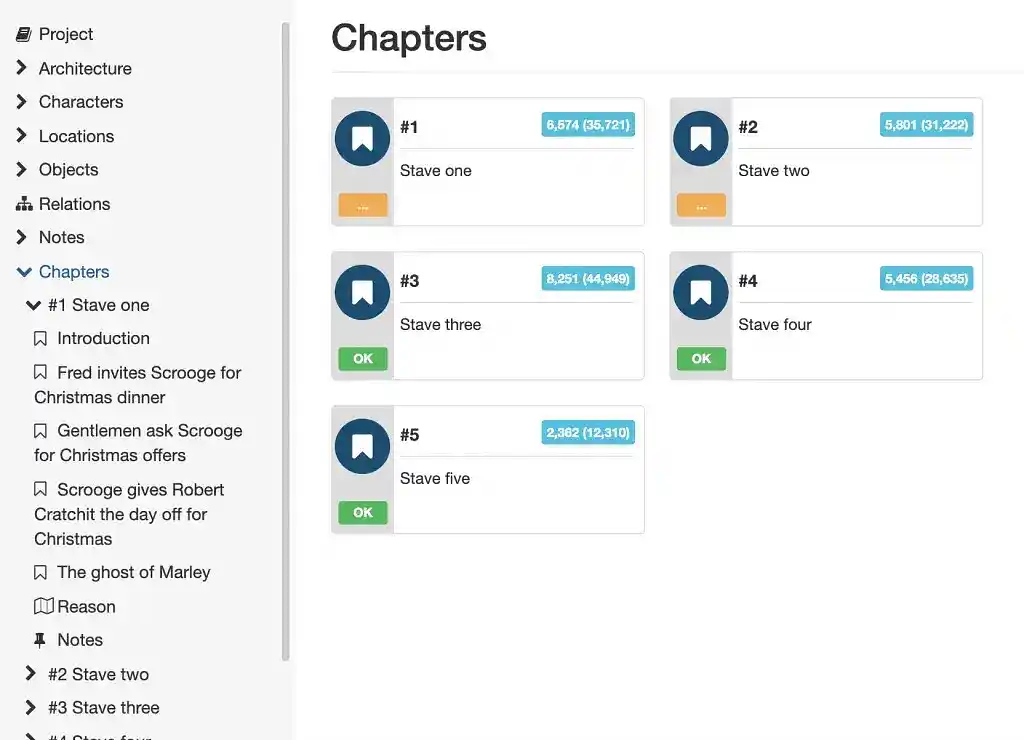 There’s nothing wrong with Bibisco, but its Premium version costs more than Scrivener and has fewer features. Bibisco lacks Scrivener’s front matter templates, extensive formatting, and split-screen mode — but it is easier to navigate as a beginner.
Bibisco is most suited to Android users looking for writing software that comes with a mobile app.
|
Pros of Bibisco |
Cons of Bibisco |
|
➕ Visual plotting tools |
➖ Limited book formatting tools |
|
➕ Intuitive interface |
➖ No collaboration tools |
|
➕ Good text formatting options |
➖ Expensive for what it is |
|
➕ Mobile app (Android only) |
|
Best free apps
For writers on a tight budget, there are several solid writing apps you can use for free.
1. Reedsy Studio (Basic)
Price: Free
Platform(s): Web
First released: 2016
Star rating: ⭐️⭐️⭐️⭐️⭐️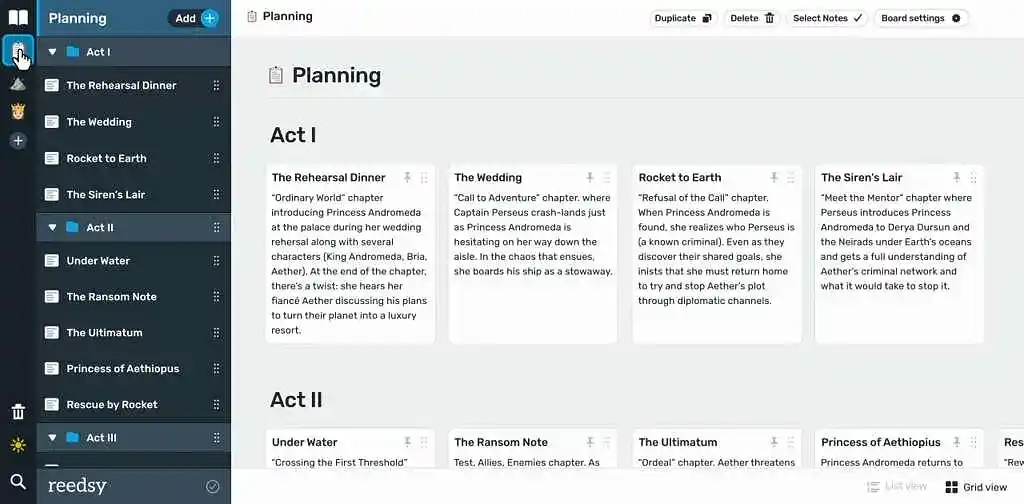 Most of the features in Reedsy Studio are free — including the all-important collaboration and formatting tools.
Even without the add-ons, you can plan your story using Boards, track your progress, and access a 30-day version history on unlimited devices.
|
Pros of Reedsy Studio |
Cons of Reedsy Studio |
|
➕ All-in-one full-service app |
➖ No offline functionality |
|
➕ Professional-grade formatting |
|
|
➕ Invite collaborators and track changes |
|
|
➕ Balanced writing interface that’s feature-filled yet clean |
|
|
➕ Free unlimited projects |
2. Novlr (Starter)
Price: Free plan; $10 per month for Starter; $20 per month for Studio. Save 20% with an annual subscription. Lifetime Studio access $499.
Platform(s): Web
First released: 2015
Star rating: ⭐️⭐️⭐️⭐️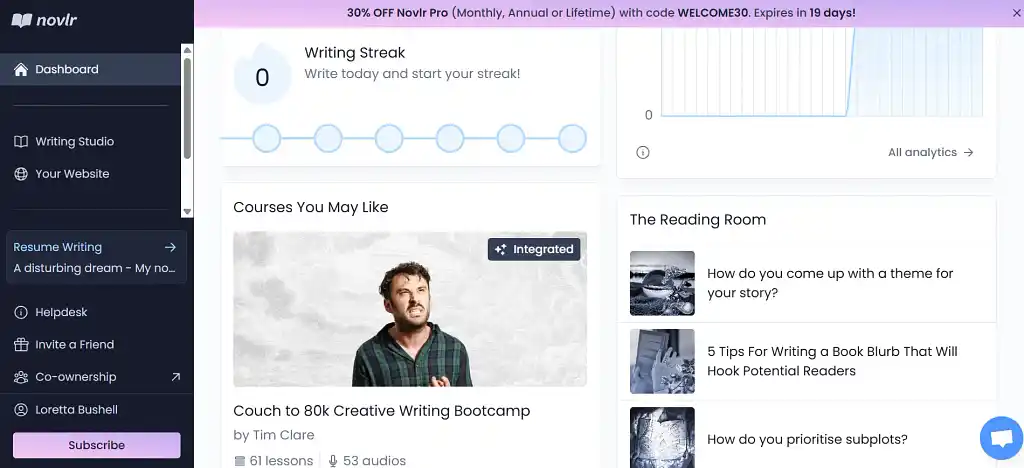 Novlr is another app with a fantastic free plan. Created by writers, for writers, Novlr stands out for its community feel. Join the active Discord server, take part in writing sprints three times a week, check out the Spotify playlist recommendations, or enroll in any of the free integrated writing courses. Novlr doesn’t just give you a space to write, but a space to make friends!
Plus, for only $10 per month, you can upgrade from two projects to unlimited projects with version history and productivity goals.
|
Pros of Novlr |
Cons of Novlr |
|
➕ Meet other writers and be part of a supportive community |
➖ Basic planning tools |
|
➕ Get writing tips and improve your craft |
➖ Limited formatting tools |
|
➕ Distraction-free writing interface |
➖ No track changes |
|
➕ Collaborate with co-owners |
3. Google Docs
Price: Free
Platform(s): Web
First released: 2006
Star rating: ⭐️⭐️⭐️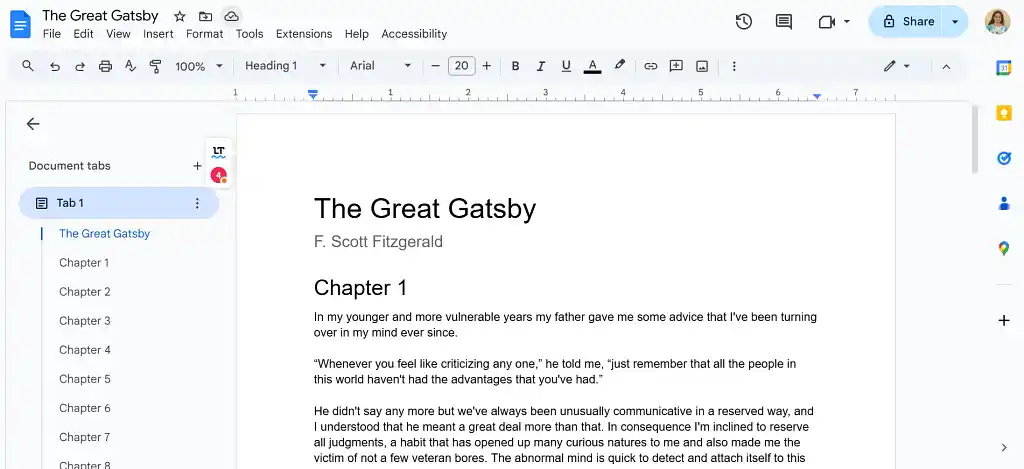 With track changes, auto-save, and decent style options, Google Docs is the go-to writing app for students and teams. Many authors also choose to draft their book in Google Docs — which can cope surprisingly well with very long documents.
Nevertheless, Google Docs is not equipped to format books. For a professional finish, you’ll need to look elsewhere.
|
Pros of Google Docs |
Cons of Google Docs |
|
➕ Invite others to suggest changes or edit directly in real time |
➖ No plotting tools or templates |
|
➕ Clean and intuitive |
➖ No specialized book formatting |
|
➕ Lots of style options |
|
|
➕ Completely free |
4. yWriter
Price: Free
Platform(s): macOS, Windows, iOS, Android
First released: 2002
Star rating: ⭐️⭐️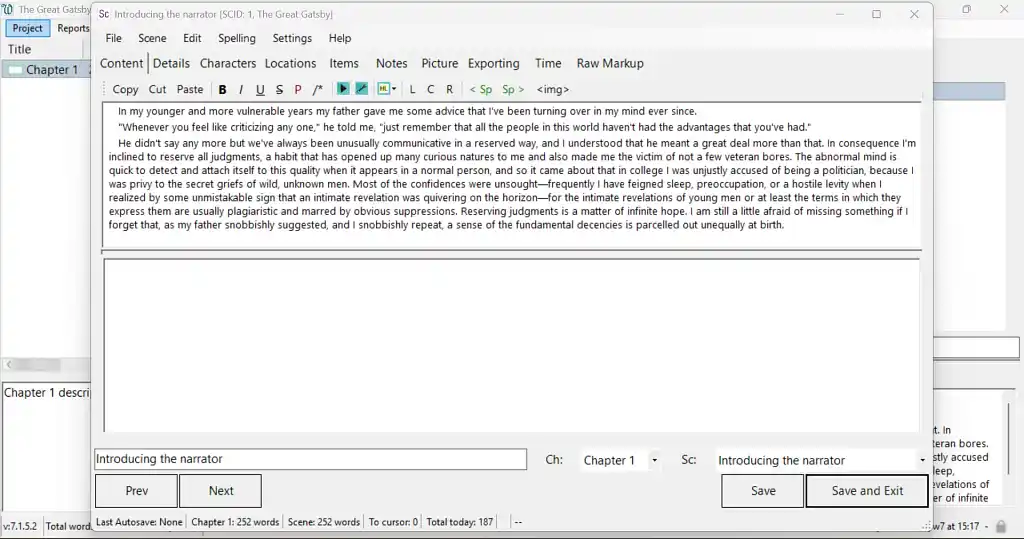 yWriter is in essence a poor person’s Scrivener. The offline app helps you organize your chapters and scenes, but lacks the advanced corkboard, split-screen, and formatting features of Scrivener. The interface is also very basic — for example, you can’t change the size of the (rather small) text and you have to edit each chapter in a popup window.
yWriter’s redeeming feature (other than its price) is its data analysis. You can count how many scenes or words relate to a particular character and generate detailed progress reports. If you’re obsessed with statistics, this might be the app for you.
|
Pros of yWriter |
Cons of yWriter |
|
➕ Detailed analytics |
➖ Basic interface and functionality |
|
➕ Completely free |
➖ Not overly intuitive |
5. Obsidian
Price: Free. $5/month for Sync add-on; $10/month for Publish add-on. Save 20% with a yearly subscription.
Platform(s): macOS, Windows, iOS, Android, Linux
First released: 2020
Star rating: ⭐️⭐️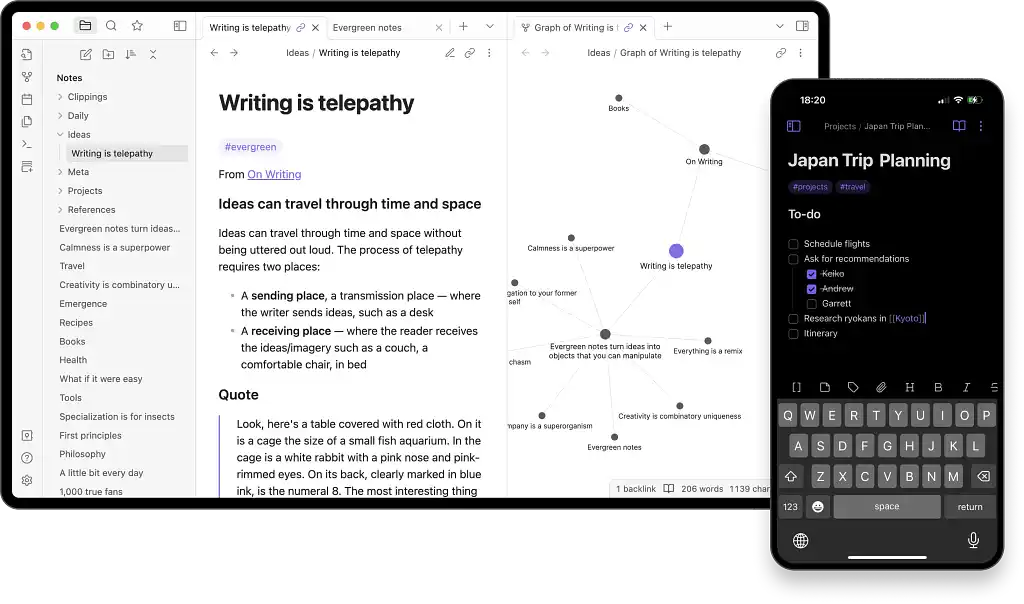 Obsidian is not a dedicated writing app, but like yWriter, it’s well-suited to a particular kind of writer. The mind map tool is famously flexible and the multitude of available plugins makes the app highly customizable — but only if you’re willing to learn how to use it.
To make the most of Obsidian, you have to familiarize yourself with Markdown, a way of inserting tags to change the style of your text without the handy buttons of other word processors. This isn’t our idea of fun, but if you like Markdown, it could be yours.
|
Pros of Obsidian |
Cons of Obsidian |
|
➕ Highly customizable |
➖ Very steep learning curve |
|
➕ Excellent visual story planning |
➖ No automatic backup |
|
➕ Markdown compatible with a wide range of other apps |
➖ Not specifically designed for writing |
|
➕ Big community you can ask for help |
Best plotting apps
If you’re still at the start of your writing journey, you might be more interested in a dedicated plotting app from the selection below.
1. Story Planner
Price: Free for one plan at a time; $15 for three months of unlimited plans; $40 for a year of unlimited plans.
Platform(s): Web
First released: 2016
Star rating: ⭐️⭐️⭐️⭐️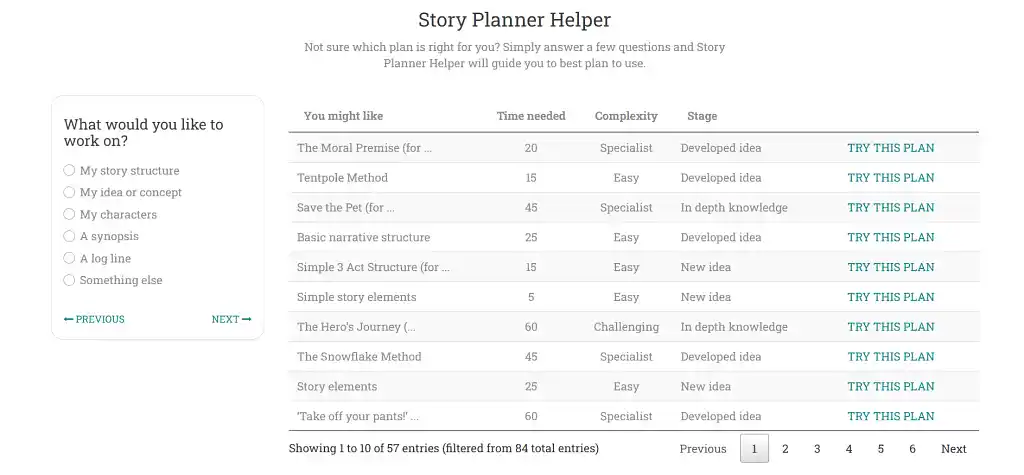 You’ve probably heard of The Hero’s Journey and Save the Cat, but have you heard of Take Off Your Pants or the Tentpole Method? Story Planner has an impressive range of story structure templates to meet every writer’s plotting needs — even nonfiction authors.
If you don’t actually know which template you need, the app also has a handy questionnaire to point you in the right direction. In addition to structure, you can plan your characters, setting, and worldbuilding with the help of extensive prompts.
If you only work on one plan at a time, then export and delete it, you can even get away with staying on the free tier.
|
Pros of Story Planner |
Cons of Story Planner |
|
➕ Broad range of templates |
➖ Plotting only |
|
➕ Detailed story development prompts |
➖ One plan at a time on the free version |
|
➕ Help identifying the right template(s) |
2. Plottr
Price: $60/year for Plottr; $9.99/month or $99/year for Plottr Pro; $14.99/month or $129/year for Plottr Pro + Community. Lifetime access $150, $599, and $649 respectively. 30-day free trial.
Platform(s): Web, macOS, Windows
First released: 2017
Star rating: ⭐️⭐️⭐️⭐️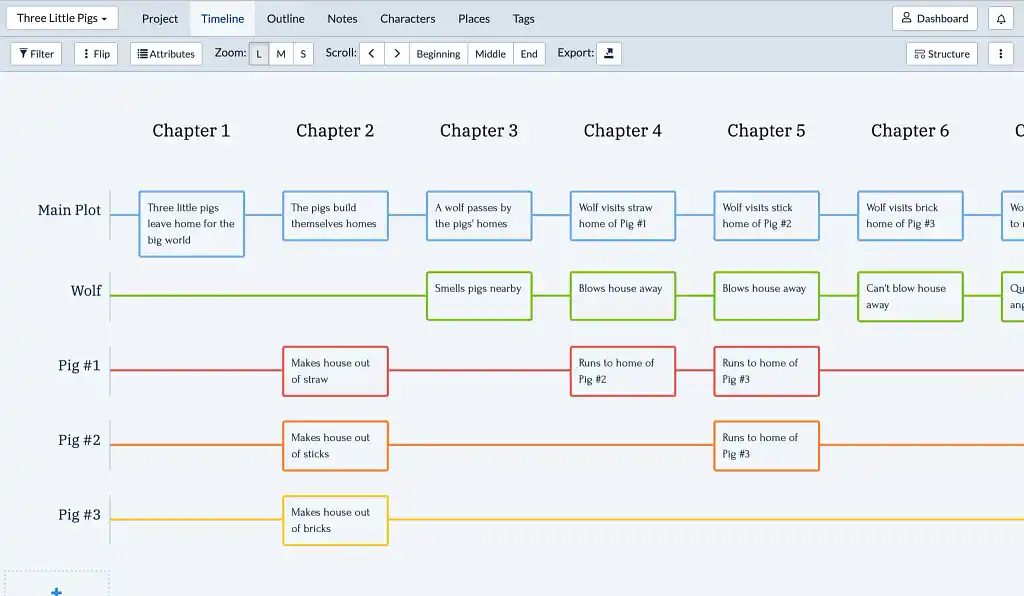 Plottr is the go-to story planning app of over 30,000 writers. It boasts a similar number of templates to Story Planner, and its intuitive drag-and-drop timelines are better suited to visual learners — but it doesn’t offer as many prompts for those seeking inspiration.
Moreover, all the best features of Plottr — cloud integration, collaboration, and community access — are reserved for the higher payment tiers, so the app can be a costly investment. It also doesn’t have an actual word processor, so you’ll still need to write somewhere else.
|
Pros of Plottr |
Cons of Plottr |
|
➕ A broad range of templates |
➖ Plotting only |
|
➕ Great visual features |
➖ Collaboration and backup only for Pro users |
|
➕ Intuitive interface |
|
|
➕ Export to MS Word or Scrivener |
3. Campfire
Price: Basic access free; pay for the modules you need or subscribe to everything for $12/month. Save 17% with an annual subscription. Lifetime access $375.
Platform(s): Web, macOS, Windows, iOS, Android
First released: 2018
Star rating: ⭐️⭐️⭐️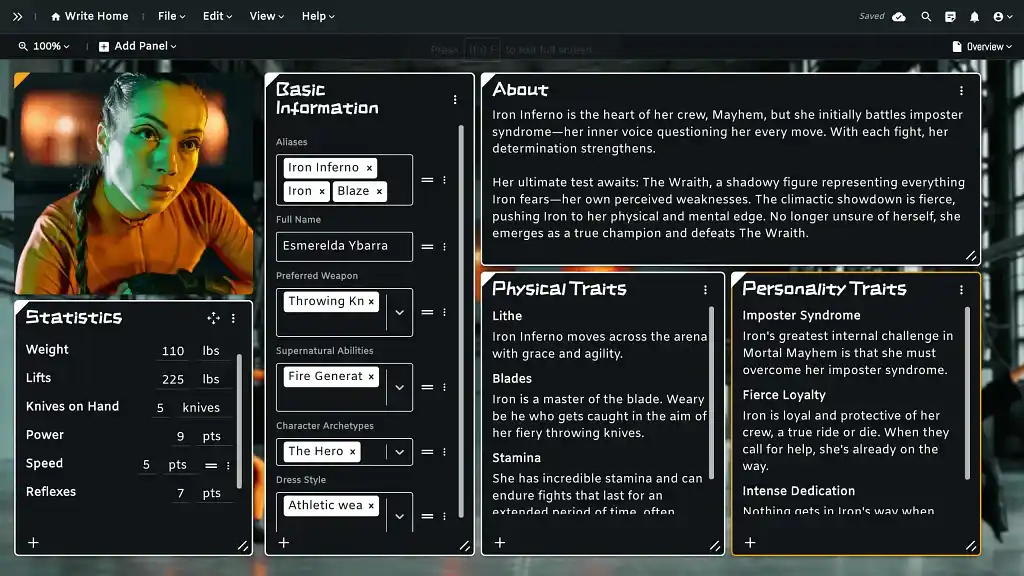 Accessible on web, desktop, and mobile, Campfire has a reputation as a worldbuilding powerhouse for fantasy and sci-fi authors. Although you can write and format your manuscript in the same place (unlike with Plottr), Campfire’s main strength is its plotting features.
With relationship webs, an interactive timeline, and even a dictionary for made-up languages, Campfire has something for everyone — and you only have to pay for the modules you actually need.
But while there’s a high quantity of templates to choose from, the depth of the worldbuilding prompts falls a long way short of Story Planner or Reedsy Studio. If you’re looking for more profound inspiration, this may not be the app for you.
|
Pros of Campfire |
Cons of Campfire |
|
➕ Only pay for what you need |
➖ Busy interface |
|
➕ Interconnected elements |
➖ Only basic formatting |
|
➕ Write directly in the app |
➖ No track changes for editing |
|
➕ Invite others to collaborate |
➖ Prompts aren’t as detailed as on Story Planner or Reedsy Studio |
|
➕ Sync with mobile app |
➖ Have to pay to write more than 25k words |
4. The Novel Factory
Price: $8.25/month for Basic; $22/month for Standard. Save 17% with an annual subscription. Lifetime access $649. 30-day free trial.
Platform(s): Web, Windows
First released: 2012
Star rating: ⭐️⭐️⭐️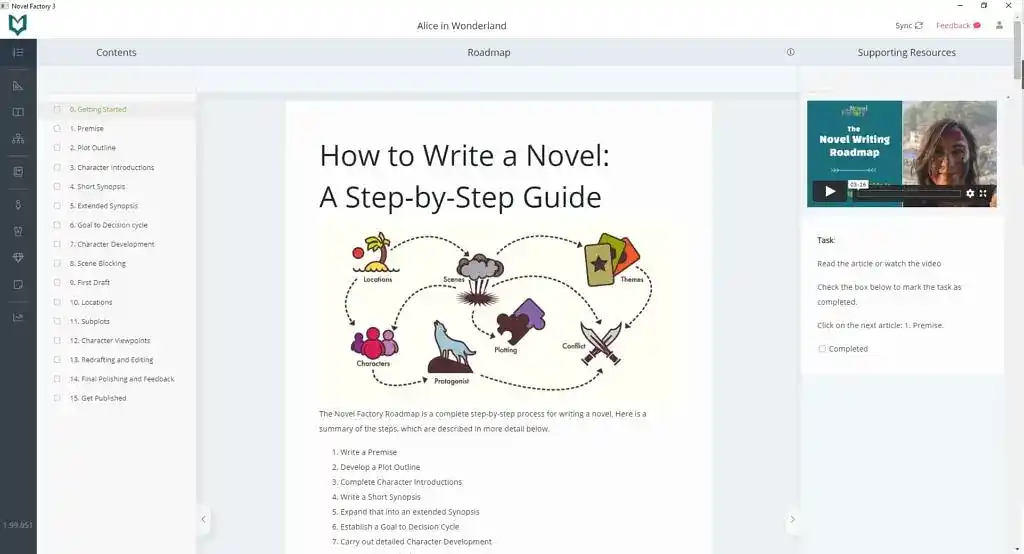 Similar to Campfire, The Novel Factory is not solely a planning app — but its plotting features are its main assets. There may “only” be nine story structure templates, but the character and location cards offer extensive prompts that rival Story Planner’s. Uniquely, there is even a dedicated space to plan your publishing pitch.
The Novel Factory also stands out for its educational tools. On most pages, you can access a help icon with craft tips (sometimes in video form), and there is a roadmap in the sidebar that gives comprehensive step-by-step instructions on writing a novel.
The Basic plan is sufficient to write a single novel. However, note there are no collaboration or book formatting tools for the editing stages and beyond.
|
Pros of The Novel Factory |
Cons of The Novel Factory |
|
➕ Templates |
➖ No book formatting |
|
➕ Detailed prompts |
➖ No collaboration tools |
|
➕ Extensive craft and publishing tips |
|
|
➕ Intuitive interface |
|
|
➕ Offline capability |
5. Wavemaker
Price: Free
Platform(s): Web
First released: 2003
Star rating: ⭐️⭐️⭐️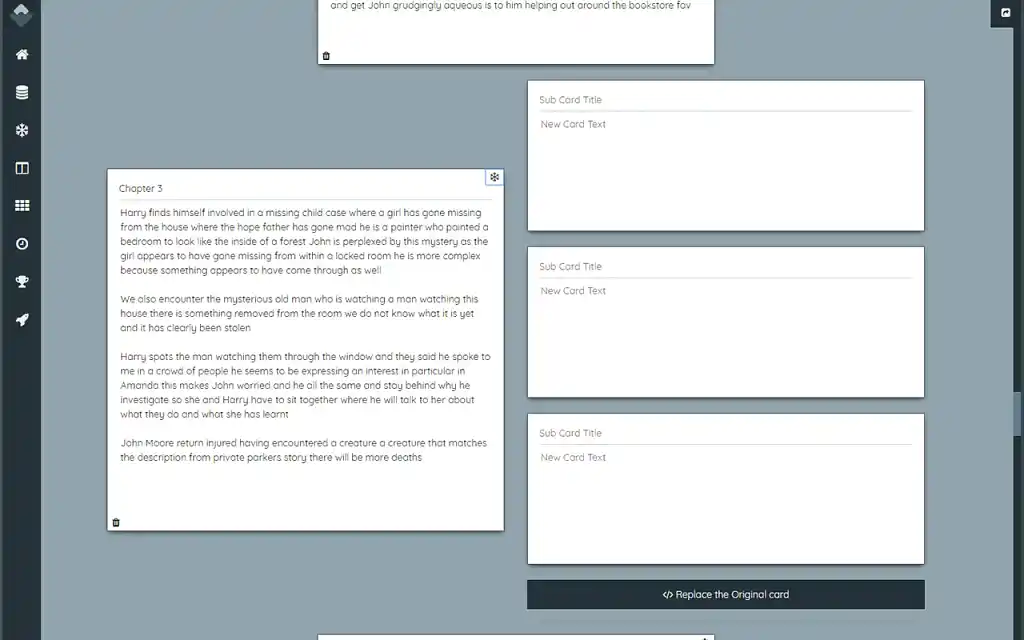 For a free app, Wavemaker has an impressive range of features. Besides boards, grids, mind maps, and timelines, Wavemaker boasts a brilliant snowflake tool whereby each card can be replaced by three more detailed cards (simulating Randy Ingermanson’s Snowflake Method).
The writing tool is decent, syncs with the cloud, and works offline. Again, though, there are no collaboration or professional formatting tools with Wavemaker.
|
Pros of Wavemaker |
Cons of Wavemaker |
|
➕ Completely free |
➖ No book formatting |
|
➕ Good visual planning tools |
➖ No collaboration tools |
|
➕ Offline functionality |
|
|
➕ Cloud backup |
6. LivingWriter
Price: Free up to 25k words; $15/month for Pro; $30/month for Po + AI. 7-day free trial.
Platform(s): Web
First released: 2020
Star rating: ⭐️⭐️⭐️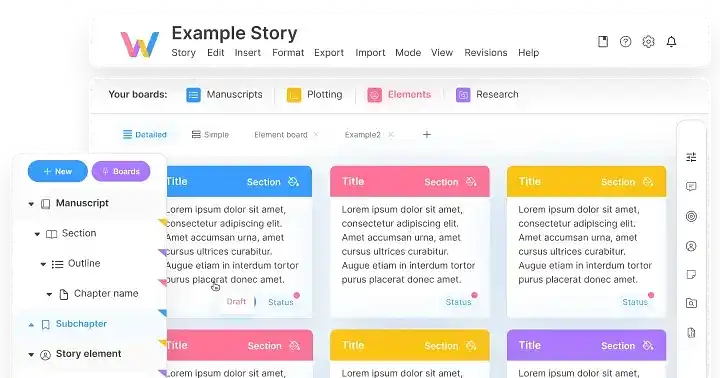 LivingWriter is another app that combines planning and writing. It only has 14 templates, but it does boast collaboration tools that allow others to view, comment on, or edit your writing as you see fit.
However, like The Novel Factory, LivingWriter doesn’t format and export your manuscript professionally. It’s also quite expensive — there are other apps in this list that are cheaper and better.
|
Pros of LivingWriter |
Cons of LivingWriter |
|
➕ Plan and write in the same app |
➖ No book formatting |
|
➕ Good collaboration tools |
➖ Plotting tools are basic |
|
➕ Intuitive and clean interface |
➖ Expensive for what it is |
Best formatting apps
Now let’s look at the other end of the writing process: prepping your book for publication.
1. Reedsy Studio
Price: Free
Platform(s): Web
First released: 2016
Star rating: ⭐️⭐️⭐️⭐️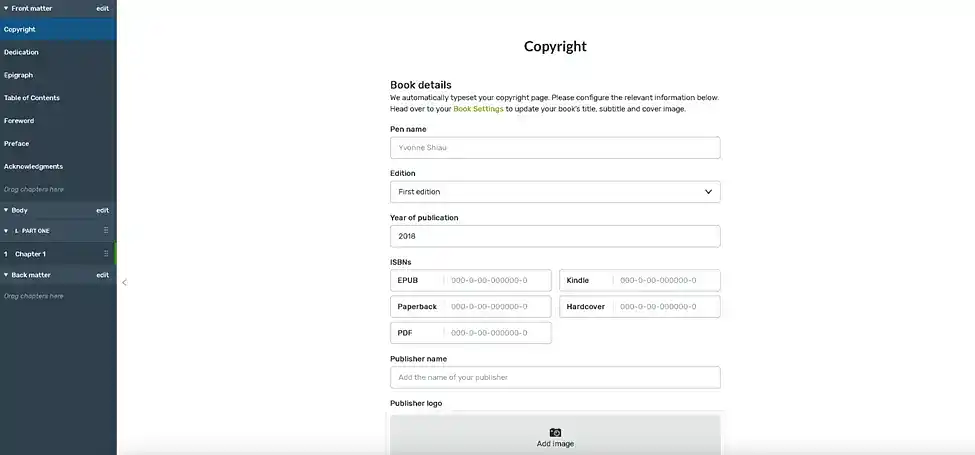
Again, Reedsy Studio can meet most authors' needs at zero cost. Studio is 100% free for book formatting, and you can export as many files as you want.
Reedsy Studio offers three essential templates — “Reedsy,” “Classic,” and “Romance” — plus easily draggable sections for front matter, body chapters, and back matter. Another pro of Studio is that you can write directly in the formatting interface, with version history and the ability to invite a collaborator (just like Google Docs).
Studio may not have as many templates as Vellum (below), but in truth, most authors don’t need a surplus of options for formatting. If you’re looking for something clean, easy, and — most importantly — free to prepare your book for publication, Studio is the answer.
|
Pros of Reedsy Studio |
Cons of Reedsy Studio |
|
➕ Free for formatting |
➖ No desktop app |
|
➕ Unlimited exports |
➖ Fewer style templates |
|
➕ Intuitive writing interface |
|
|
➕ Pre-formatted sections for dedication, table of contents, acknowledgements, etc. |
|
|
➕ Can also plan, write, and edit your book in the same app |
2. Vellum
Price: $199.99 for ebooks; $249.99 for print formatting.
Platform(s): macOS
First released: 2013
Star rating: ⭐️⭐️⭐️⭐️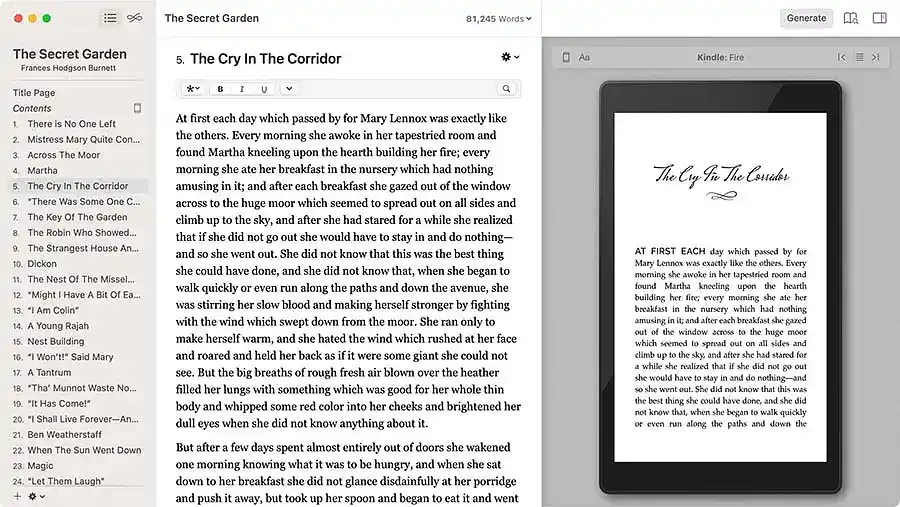 For those who do have more complex formatting needs, Vellum has 25+ “Style” templates — more than any other app on this list — and offers a polished yet distinctive look for any title.
The main drawback of Velllum is the license fee. $199.99 is a bit steep if you’re only going to be formatting and publishing one or two ebooks. Newer apps, like Atticus and Reedsy Studio, have similar templates (though not as many options) at lower price points, in addition to online access — whereas Vellum is only available on Mac.
Still, if you’re looking to make a career in self-publishing, Vellum’s wide range of formatting options and smooth file exporting could be worth the investment.
|
Pros of Vellum |
Cons of Vellum |
|
➕ 26 total formatting templates to try |
➖ Steep license fee |
|
➕ Customizable within each template — type, chapter headings, scene breaks, etc. |
➖ Only works on Mac |
|
➕ Instant text preview for e-readers |
|
|
➕ Surprisingly strong writing interface |
3. Atticus
Price: $147
Platform(s): Web, macOS, Windows, Linux
First released: 2021
Star rating: ⭐️⭐️⭐️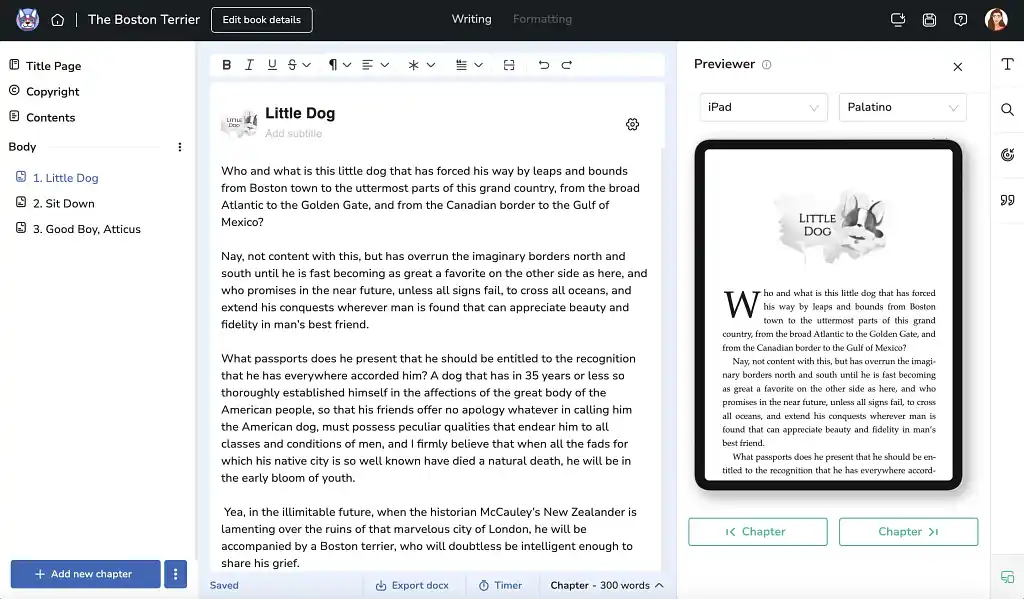 Designed as a direct competitor to Vellum, Atticus positions itself as a full-service platform with a focus on formatting. Authors can choose from 17 preset templates or even use the app’s custom theme builder (though we wouldn’t recommend this for novices).
With 1,500 (!) different fonts and visual “callout boxes,” Atticus is an undeniably advanced tool. But it’s not as strong for in-app writing as Studio, and it’s not as sophisticated as Vellum for formatting — plus, unlike the other apps, there’s no free trial to try it out.
|
Pros of Atticus |
Cons of Atticus |
|
➕ 17 preset formatting templates |
➖ High license fee, with no options for tiers or monthly subscriptions |
|
➕ Additional customizability via fonts, subheadings, and other visual elements |
➖ No free trial |
|
➕ Works on web and desktop |
➖ Buggy interface when making many changes at once |
|
➕ Text preview for e-readers |
➖ Not really “designed” for writing |
4. Apple Pages
Price: Free
Platform(s): macOS, iOS
First released: 2005
Star rating: ⭐️⭐️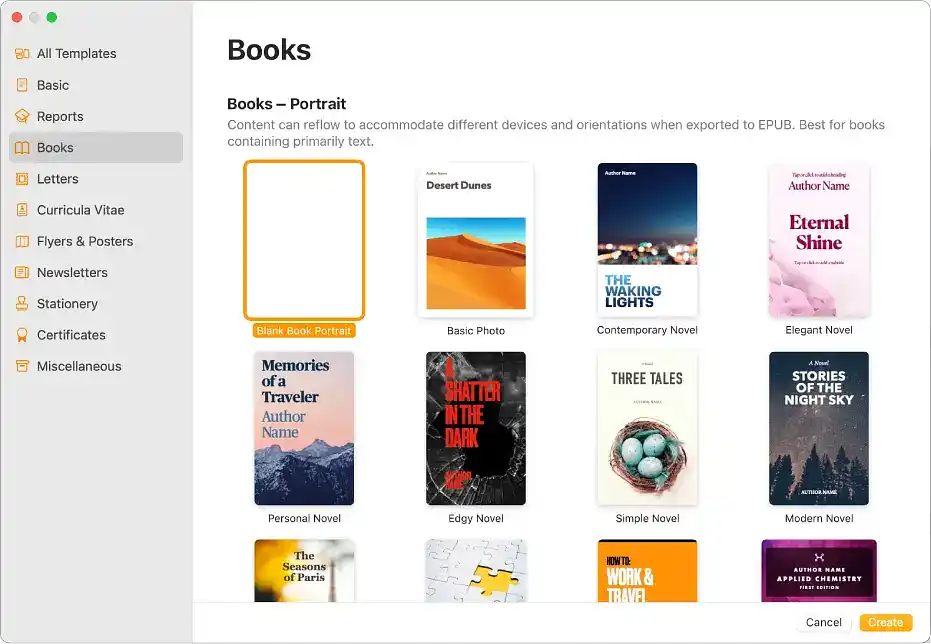 Apple Pages has several book-specific templates, each of which also includes a premade cover — 12 styles with names like “Simple Novel,” “Modern Novel,” and “Edgy Novel.”
This might sound pretty good (for Apple users, anyway!). But keep in mind that the app’s word processing is less than ideal. It’s not difficult to write in Pages, per se, but there’s no “neutral” word processor — so you have to add text in the landscape-oriented Books template, which is a slightly odd experience.
Apple Pages also doesn’t have advanced typesetting features. There’s no kerning, so the letters in your text may not appear as well-spaced as they would if you used more professional formatting software.
|
Pros of Apple Pages |
Cons of Apple Pages |
|
➕ Free for Apple users |
➖ Poor interface for actually writing |
|
➕ Quality templates for cover design and interior layout |
➖ No advanced typesetting features such as kerning |
|
➕ Export directly into Apple Books |
➖ Obviously only works on Apple |
Other writing apps
We'll finish with some apps that don’t quite slot into the categories above, but are still worth a test run.
1. Fictionary
Price: $19/month for Story Structure Software; $39/month for StoryTeller Premium. Save 25% with an annual subscription. 7-day free trial.
Platform(s): Web
First released: 2017
Star rating: ⭐️⭐️⭐️
Best for: Community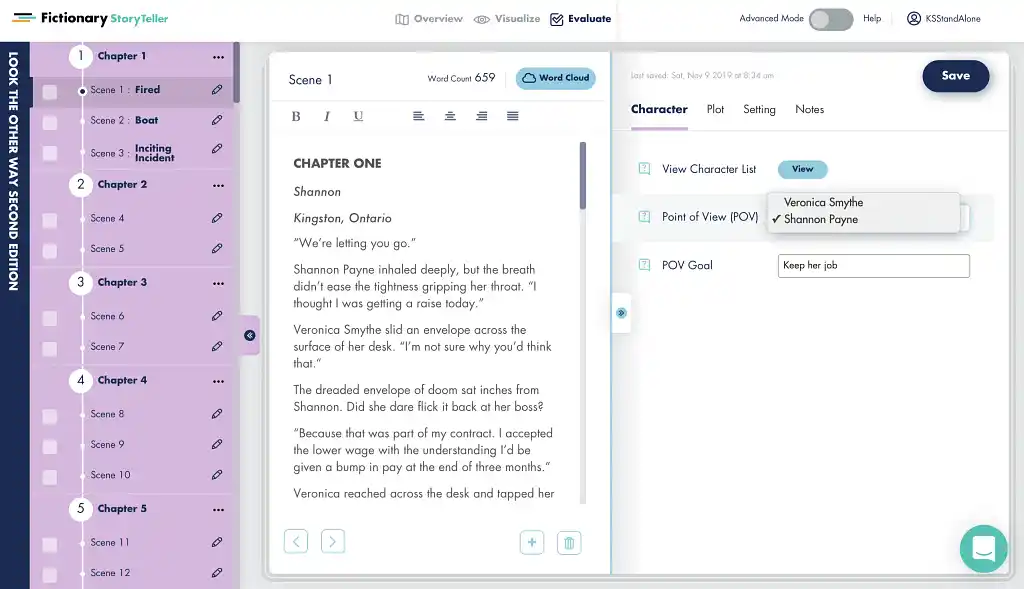 First up is Fictionary, an established platform where authors can plot, write, and connect with fellow creatives.
The StoryTeller app in Fictionary is serviceable for writing, with plenty of planning features — but the interface is clunky compared to other web apps. Where Fictionary shines is its community features: free resources and one-off events for members, plus forums where you can commiserate and ask professional editors (who work for Fictionary) for craft advice.
|
Pros of Fictionary |
Cons of Fictionary |
|
➕ Dynamic dashboard with resources, classes, and upcoming events |
➖ Main writing interface is too busy and slow to update |
|
➕ Excellent community features, including themed groups/forums |
➖ Minimal formatting features |
|
➕ Lots of story templates and prompts in the StoryTeller app |
➖ Can only access advanced classes through paid “Courses” tier |
2. Storyist
Price: $59 for desktop; $19 for phone. Free trial.
Platform(s): macOS, iOS
First released: 2007
Star rating: ⭐️⭐️⭐️
Best for: Full service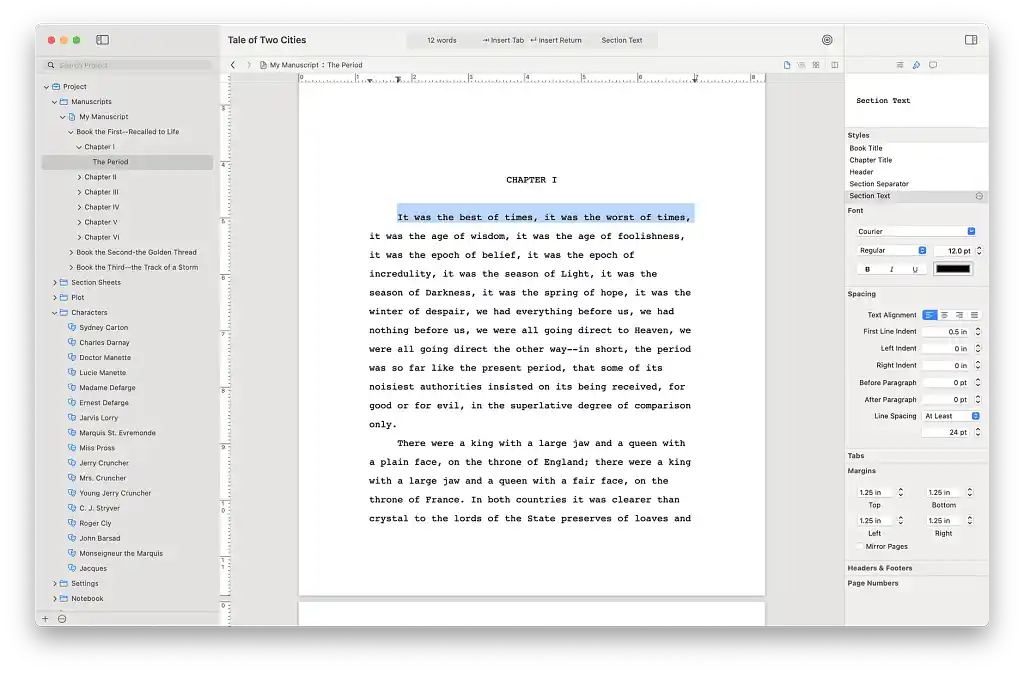 Storyist takes a “focused” approach for authors looking to write and publish their books. Though it has different modes for novelists, screenwriters, and playwrights, the app itself is pretty minimalist — which is great for writing, but not as great for formatting.
Compared to similar apps, it’s certainly a low-frills setup… as reflected by the reasonable price! We’d still suggest trying Studio (above) first if you’re seeking a budget-friendly, all-in-one app, but Storyist is not a bad alternative — more so if you’re also interested in screenwriting.
|
Pros of Storyist |
Cons of Storyist |
|
➕ Focus-friendly interface |
➖ Only works on Apple devices |
|
➕ Works for novelists, screenwriters, and playwrights |
➖ Planning templates are extremely basic |
|
➕ Word count goals + data breakdown for writing progress |
➖ Not many formatting templates |
|
➕ Nice export results (though don’t forget to de-select your “planning” pages!) |
|
3. Final Draft
Price: $249.99
Platform(s): macOS, Windows
First released: 1990
Star rating: ⭐️⭐️⭐️
Best for: Screenwriting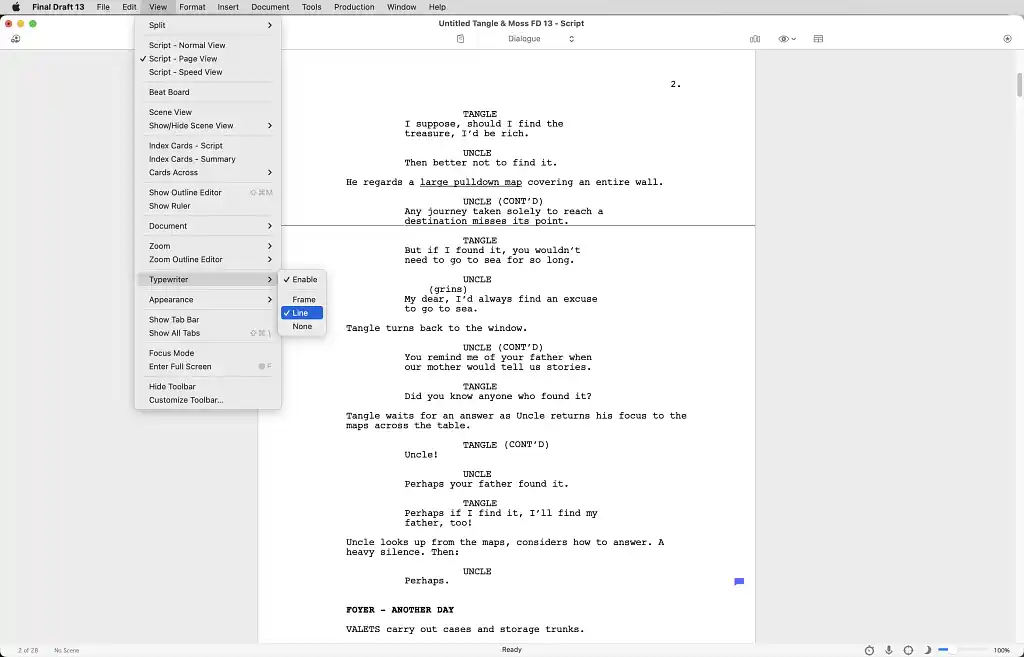 If you’re exclusively a screenwriter, though, don’t bother with Storyist. Instead, download Final Draft like all the other serious professionals. It features industry-standard formatting, a beat board for planning, a sprint timer, and collaborative tools.
Final Draft can also be used for writing books, but we wouldn’t recommend it when you can get a more streamlined app for a lot cheaper.
|
Pros of Final Draft |
Cons of Final Draft |
|
➕ Industry-standard screenplay formatting |
➖ Very expensive |
|
➕ Collaboration tools |
➖ Geared towards screenwriters only |
|
➕ Planning tools |
➖ 5-day free trial (only for Final Draft Suite combo package) |
|
➕ Productivity tools |
4. AutoCrit
Price: Free for AutoCrit Essential; $30/month for AutoCrit Pro. Save 50% with an annual subscription.
Platform(s): Web
First released: 2006
Star rating: ⭐️⭐️⭐️
Best for: Self-editing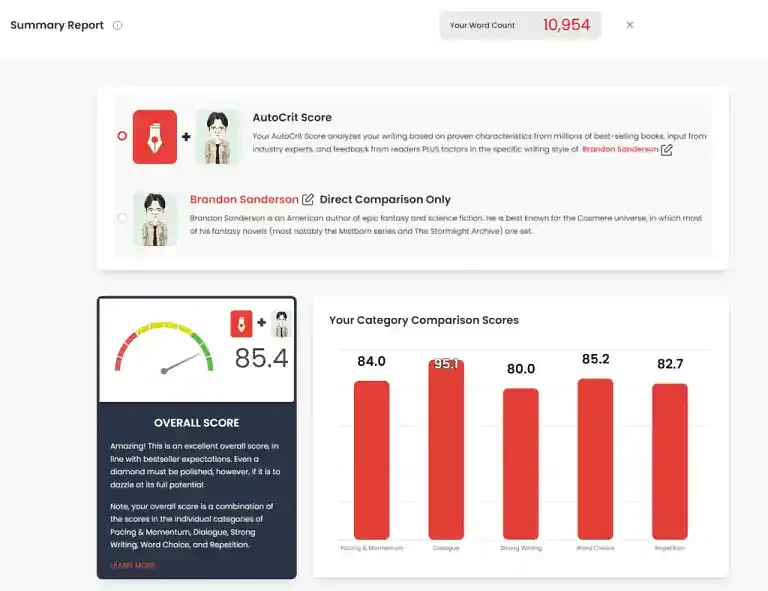 If you’ve ever searched for editing apps online, you’ve probably stumbled across AutoCrit. This web-based app provides detailed feedback for writers on everything from passive voice to readability to pacing. It’ll even tell you how your writing stacks up to other authors in your genre!
Impressively, the AutoCrit site claims this feedback is all based on original algorithms, not generative AI (although the searate Inspiration Studio does use AI.) Once you’re aware of your draft’s strengths and weaknesses, AutoCrit is a strong first line of defense against the latter. (You’ll still want to hire a professional editor before you publish, though — when it comes to editing, nothing beats human eyes.)
|
Pros of AutoCrit |
Cons of AutoCrit |
|
➕ Select genre/category to get highly tailored feedback |
➖ Excessive analysis can be overwhelming |
|
➕ 25+ types of feedback reports in 7 categories (Word Choice, Pacing, etc.) |
➖ “Story Builder” plotting tool is not very intuitive |
|
➕ Track Goals & Stats in the app |
➖ Export feature is fairly poor |
|
➕ Strong community forums (with Pro plan) |
|
5. Hemingway
Price: Free web version; $19.99 for the desktop version; from $25/month for Editor Plus. Save up to 66% with an annual subscription. 14-day free trial.
Platform(s): Web, macOS, Windows
First released: 2013
Star rating: ⭐️⭐️
Best for: Self-editing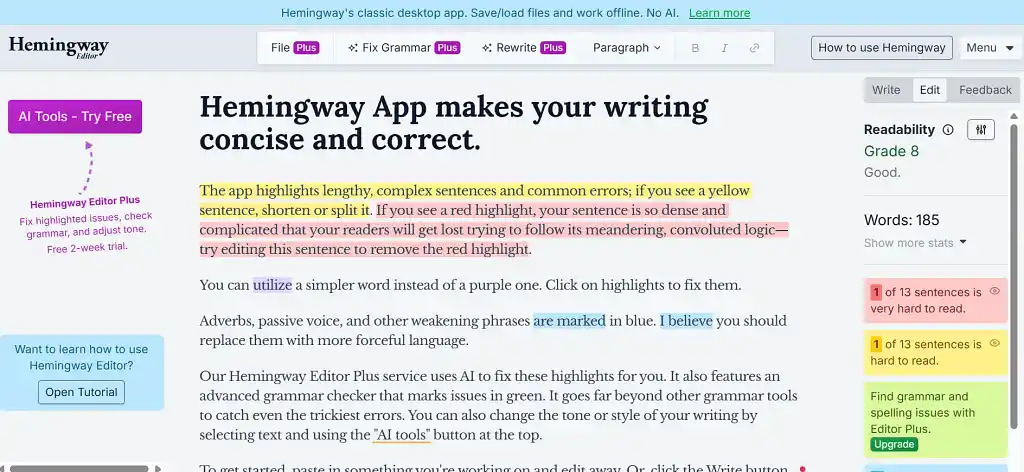 Hemingway is another self-editing platform — one that does use AI. Hemingway tells you what’s hindering your readability and suggests AI improvements in Editor Plus. The distraction-free write mode is a nice touch, letting you type without feedback until you are ready for it.
While some of Hemingway’s tips are helpful, users should be wary of following all its advice blindly. Don’t change too much to compromise your voice, or fix alleged “mistakes” that are intentionally there for style.
|
Pros of Hemingway |
Cons of Hemingway |
|
➕ Assists with self-editing |
➖ No file organization |
|
➕ Intuitive interface |
➖ No book formatting |
|
➕ Distraction-free focus mode |
➖ No (human) collaboration |
|
➖ No save function in the web version |
6. FocusWriter
Price: Free
Platform(s): Windows, Linux
First released: 2008
Star rating: ⭐️⭐️⭐️⭐️
Best for: Focus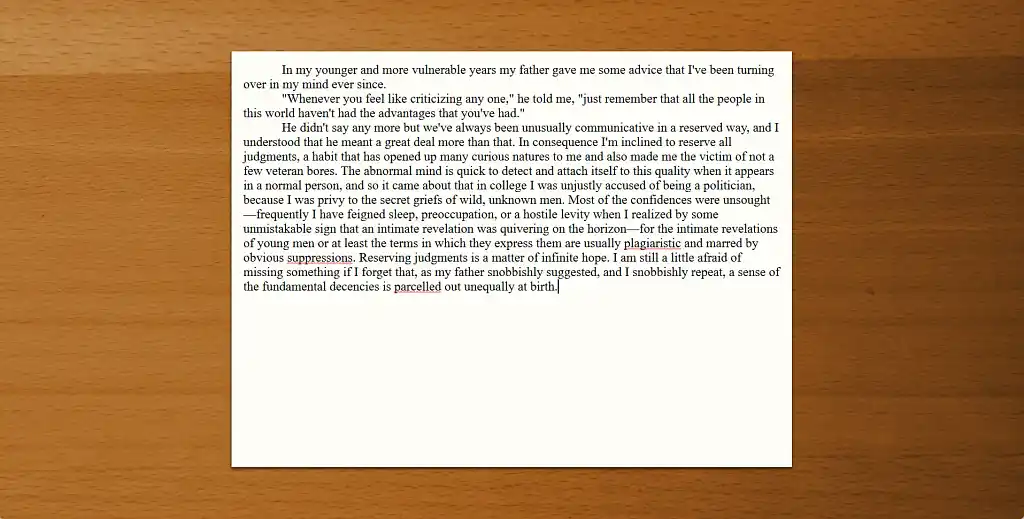 You can’t format your book in FocusWriter, but you can say goodbye to procrastination in the drafting stage. FocusWriter epitomizes minimalism with its distraction-free writing environment.
The default background is a wooden desk with optional typewriter sounds to transport you to the past. The hidden toolbar reveals basic style formatting options, as well as progress tracking, timers, and alarms to maximize productivity.
|
Pros of FocusWriter |
Cons of FocusWriter |
|
➕ Distraction-free environment |
➖ Text processor only |
|
➕ Customizable theme |
|
|
➕ Productivity features |
7. iA Writer
Price: $49.99 for macOS; $29.99 for Windows; $19.99 for iOS.
Platform(s): macOS, Windows, iOS
First released: 2010
Star rating: ⭐️⭐️
Best for: Focus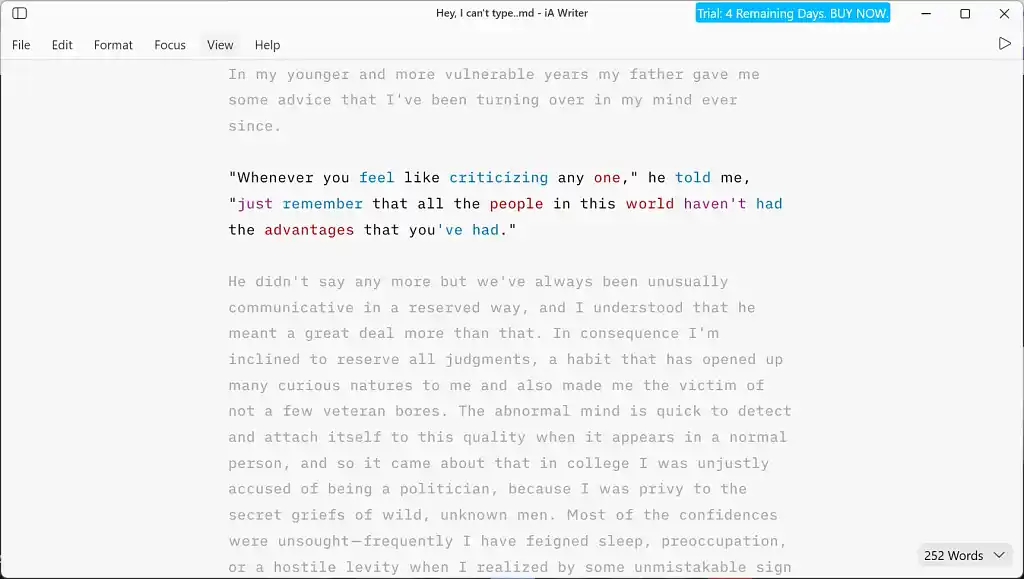 iA Writer is another focus-based writing app. Although it uses Markdown, you can still apply style formats to your text using the hidden toolbar, so there’s no requirement to learn the language.
iA Writer lacks productivity tracking and customizable themes, but it beats Focus Writer in the self-editing department. You can activate checks for clichés, fillers, and redundancies and can even highlight different parts of speech in different colors to help regulate your word choices. However, we don’t think it’s worth the cost when you’ll need a different app for collaborating and formatting anyway.
|
Pros of iA Writer |
Cons of iA Writer |
|
➕ Distraction-free writing environment |
➖ Text processor only |
|
➕ Assists with self-editing |
➖ Costs a lot more than FocusWriter |
8. Ulysses
Price: $5.99/month. Save 45% with an annual subscription.
Platforms: macOS, iOS
First released: 2003
Star rating: ⭐️⭐️
Best for: Focus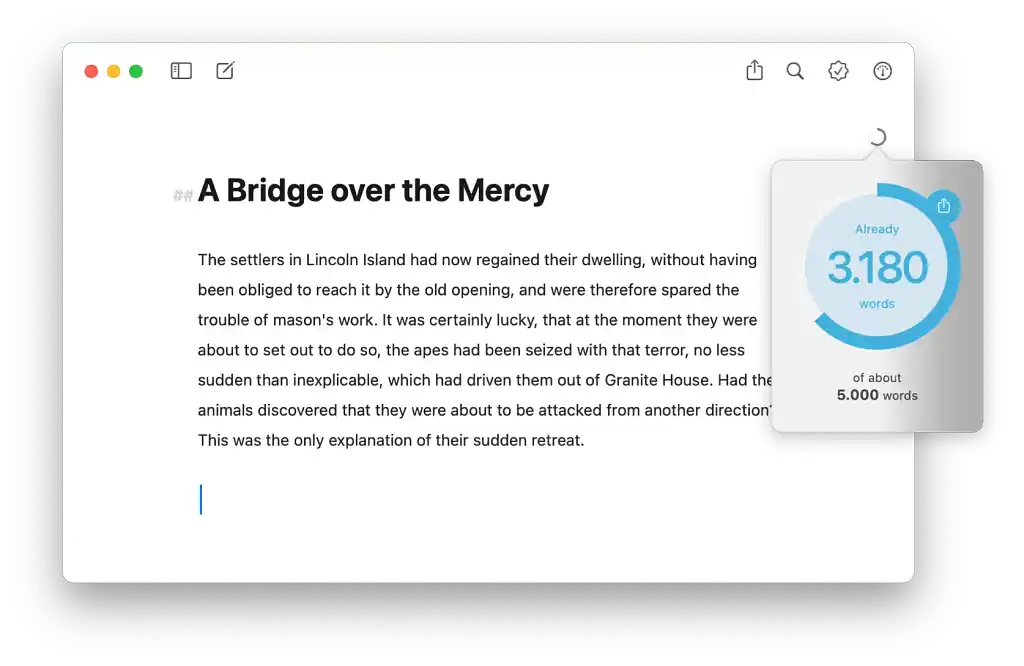 A third focus app, Ulysses is a little too bare-bones, lacking sufficient guidance. Like Obsidian and iA Writer (above), it relies on Markdown for optimal usage — which ironically gives it a bit of a learning curve.
The price is fine for what Ulysses offers, which also includes daily goals, deadlines, and stats. But if you’re seeking focus-friendliness above all, FocusWriter is a better choice.
|
Pros of Ulysses |
Cons of Ulysses |
|
➕ Distraction-free writing space |
➖ Markdown can be difficult (plus Markdown files take up a lot of space) |
|
➕ Goals & stats for productivity |
➖ Only works on Apple devices |
|
➕ Ulysses team rolls out frequent (minor) updates |
|
|
➕ Ability to export for publishing |
|
9. SudoWrite
Price: $19/month for Hobby & Student; $29/month for Professional; $59/month for Max. Save 25%+ with an annual subscription.
Platform(s): Web, iOS, Android
First released: 2021
Star rating: ⭐️
Best for: AI-assisted writing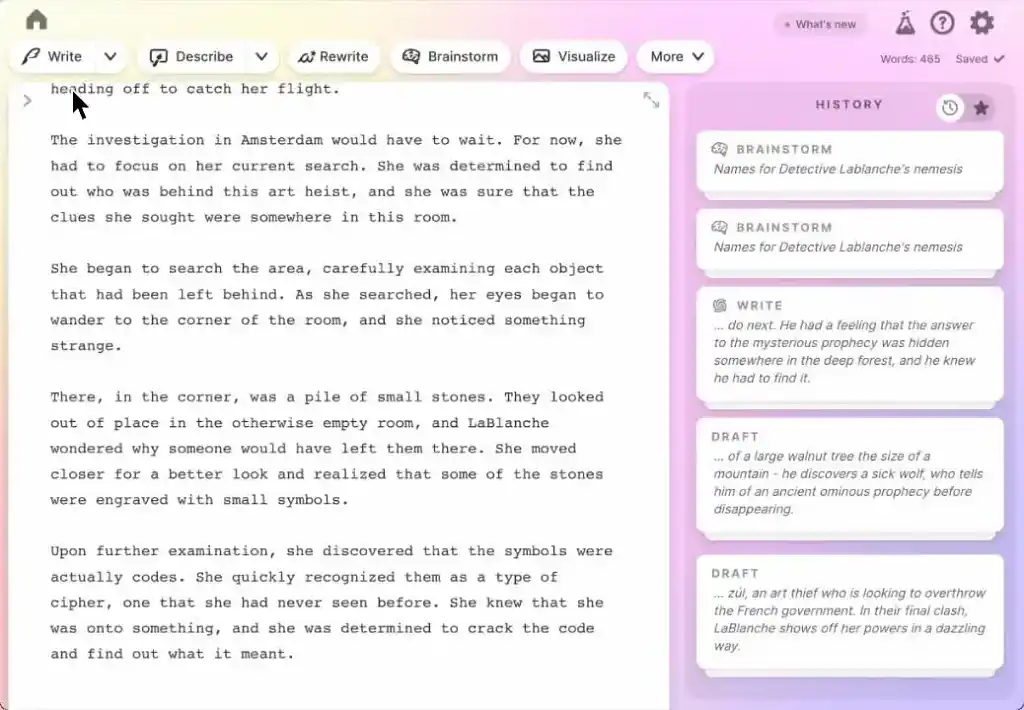 If you’re determined to use AI to write your book for you, SudoWrite is the app to use. But of course, we can’t recommend letting AI loose on your project in earnest. You’re better off hiring a ghostwriter who can truly understand your voice and produce something original, rather than recycled by an algorithm.
SudoWrite can continue a text you have started, rewrite passages, or insert descriptions, so it can provide inspiration to help you overcome writer’s block — but at a high cost, both economically and in terms of self-fulfillment.
|
Pros of SudoWrite |
Cons of SudoWrite |
|
➕ Can find inspiration |
➖ AI takes away your voice |
|
➖ Limited export file types |
|
|
➖ Very expensive |
And that’s a wrap! Wherever you are in your writing journey, we hope you’ve found the app(s) for you. Happy writing!